> ## Documentation Index
> Fetch the complete documentation index at: https://docs.pixdeliver.com/llms.txt
> Use this file to discover all available pages before exploring further.
# Browsing a gallery
> A guide for clients - how to browse photos in a gallery

 ## For a photographer's clients
This guide is intended for people who have received a gallery link from a photographer.
Some galleries are **paid** — in that case the photos have a watermark, and you receive the originals after purchase. How it works: [Buying photos](/en/client-guide/buying-photos).
***
## Opening the gallery
### Step 1: Click the link
The photographer has sent you a link that looks something like:
* `https://pixdeliver.com/g/gallery-name`
* or `https://photographer.pixdeliver.com/gallery-name`
**Click this link** in the email, SMS, or message.
### Step 2: Enter the password (if required)
If the gallery is password-protected:
1. You'll see a screen with a field to enter the password
2. Enter the password (you'll find it in the message from the photographer)
3. Click **Open gallery**
**Result:** The gallery opens and you'll see all the photos.
The password is remembered in your browser — you don't have to enter it every time you visit. If you open the gallery in private mode or on another device, you'll have to enter the password again.
### What if the gallery has expired?
The photographer pays for each gallery for a set period. If the validity period has passed, you'll see a page informing you that the gallery has expired. In that case, contact the photographer — only they can renew access.
***
## Browsing the photos
### Grid view
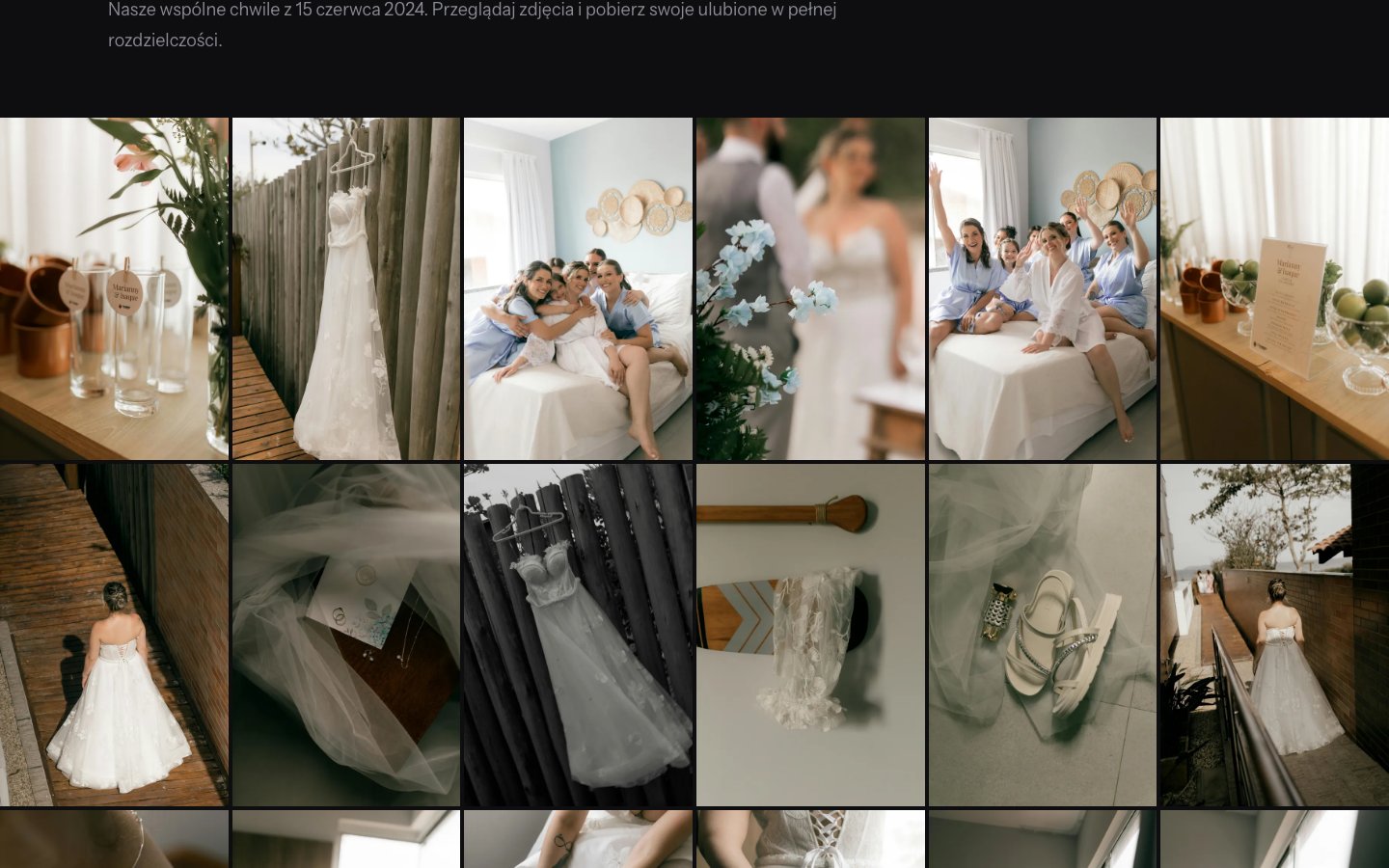
After opening the gallery you'll see:
* **Thumbnails of all the photos** arranged in a grid
* **The gallery name** at the top
* **A description** (if the photographer added one)
* **A "Download the whole gallery" button**
### Full-screen preview
**To see a photo at full size:**
1. Click any photo in the grid
2. A full-screen view opens
3. Use:
* **The ← → arrows** (keyboard) or the on-screen buttons - move between photos
* **Space** - pause/resume the slideshow
* **Escape** or **X** - close the preview
***
## Downloading photos
### A single photo
**Instructions:**
1. Open the photo (click on it)
2. Click the **Download** button (the down-arrow icon)
3. The photo downloads to your device
### The whole gallery (all photos)
**Instructions:**
1. At the top of the gallery, click the **Download all** button
2. Choose the location to download the **ZIP archive** to
3. Don't close the window until the download finishes
**The download link is temporary.** For security reasons, the link to the ZIP archive is valid for about 2 hours. If the link expires, click "Download the whole gallery" again to generate a new one.
***
## Photo quality
All downloaded photos are high quality - exactly as your photographer delivered them:
* ✅ Suitable for large-format printing
* ✅ Perfect for social media
* ✅ Great for frames and albums
***
## Sharing the gallery
You can share the gallery link with family and friends:
1. Copy the link from your browser's address bar
2. Send it to the people you choose
3. **If the gallery has a password** - share the password too
***
## Problems?
**The gallery requires a password, but I don't have one:**
* Check the message from the photographer (email, SMS)
* Contact the photographer
**The link doesn't work:**
* Check that the link was copied in full
* Try a different browser
* Contact the photographer
**I see a "Gallery expired" page:**
* The gallery's validity period has passed
* Only the photographer can renew the gallery — write to them to request an extension
**I can't download the photos:**
* Check your internet connection
* Try again in a moment
* Download the photos one by one instead of the whole gallery
* If you see a "link expired" message — generate a new one by clicking **Download all** again
## For a photographer's clients
This guide is intended for people who have received a gallery link from a photographer.
Some galleries are **paid** — in that case the photos have a watermark, and you receive the originals after purchase. How it works: [Buying photos](/en/client-guide/buying-photos).
***
## Opening the gallery
### Step 1: Click the link
The photographer has sent you a link that looks something like:
* `https://pixdeliver.com/g/gallery-name`
* or `https://photographer.pixdeliver.com/gallery-name`
**Click this link** in the email, SMS, or message.
### Step 2: Enter the password (if required)
If the gallery is password-protected:
1. You'll see a screen with a field to enter the password
2. Enter the password (you'll find it in the message from the photographer)
3. Click **Open gallery**
**Result:** The gallery opens and you'll see all the photos.
The password is remembered in your browser — you don't have to enter it every time you visit. If you open the gallery in private mode or on another device, you'll have to enter the password again.
### What if the gallery has expired?
The photographer pays for each gallery for a set period. If the validity period has passed, you'll see a page informing you that the gallery has expired. In that case, contact the photographer — only they can renew access.
***
## Browsing the photos
### Grid view
After opening the gallery you'll see:
* **Thumbnails of all the photos** arranged in a grid
* **The gallery name** at the top
* **A description** (if the photographer added one)
* **A "Download the whole gallery" button**
### Full-screen preview
**To see a photo at full size:**
1. Click any photo in the grid
2. A full-screen view opens
3. Use:
* **The ← → arrows** (keyboard) or the on-screen buttons - move between photos
* **Space** - pause/resume the slideshow
* **Escape** or **X** - close the preview
***
## Downloading photos
### A single photo
**Instructions:**
1. Open the photo (click on it)
2. Click the **Download** button (the down-arrow icon)
3. The photo downloads to your device
### The whole gallery (all photos)
**Instructions:**
1. At the top of the gallery, click the **Download all** button
2. Choose the location to download the **ZIP archive** to
3. Don't close the window until the download finishes
**The download link is temporary.** For security reasons, the link to the ZIP archive is valid for about 2 hours. If the link expires, click "Download the whole gallery" again to generate a new one.
***
## Photo quality
All downloaded photos are high quality - exactly as your photographer delivered them:
* ✅ Suitable for large-format printing
* ✅ Perfect for social media
* ✅ Great for frames and albums
***
## Sharing the gallery
You can share the gallery link with family and friends:
1. Copy the link from your browser's address bar
2. Send it to the people you choose
3. **If the gallery has a password** - share the password too
***
## Problems?
**The gallery requires a password, but I don't have one:**
* Check the message from the photographer (email, SMS)
* Contact the photographer
**The link doesn't work:**
* Check that the link was copied in full
* Try a different browser
* Contact the photographer
**I see a "Gallery expired" page:**
* The gallery's validity period has passed
* Only the photographer can renew the gallery — write to them to request an extension
**I can't download the photos:**
* Check your internet connection
* Try again in a moment
* Download the photos one by one instead of the whole gallery
* If you see a "link expired" message — generate a new one by clicking **Download all** again