> ## Documentation Index
> Fetch the complete documentation index at: https://docs.pixdeliver.com/llms.txt
> Use this file to discover all available pages before exploring further.
# Selling galleries
> Sell photos to your clients: delivery modes, watermark, and pricing
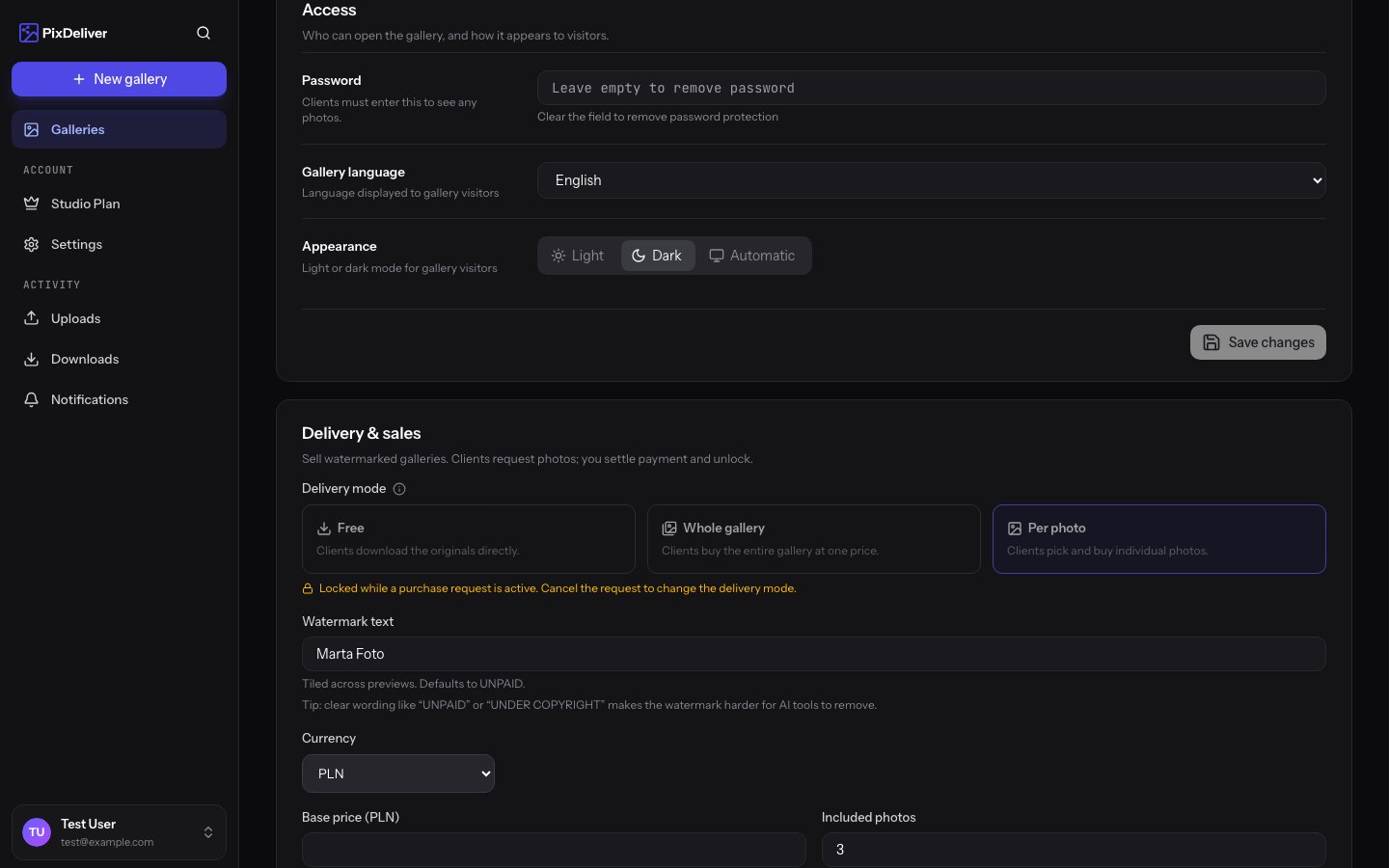 ## Overview
PixDeliver lets you deliver photos for free or **sell** them. You share each gallery in one of three **delivery modes**. In the paid modes, clients see watermarked previews, and you only unlock the clean originals once you receive payment.
**Payment happens outside the app.** PixDeliver does not act as an intermediary in photo sales and **does not charge any commission** — you settle up with the client however you like (bank transfer, BLIK, cash, etc.) and then manually unlock the photos. For the full guide to the selling side, see [Purchase requests and settlement](/en/delivery-and-sales/requests-and-settlement).
The paid mode works within an **active (paid) gallery**. The fee for the gallery itself (per-gallery plan or the [Studio plan](/en/payments/plans-and-pricing)) is separate from the price you set for clients to buy photos.
***
## The three delivery modes
### Free — clients download the originals
* Clients download full-resolution originals right away — no payment and no watermark
* No watermark, no lock, no purchase requests
* This is the default mode for a new gallery
**Who it's for:** delivering sessions that were paid for in advance, event photos, materials for businesses.
### Paid — buy the whole gallery
* Clients see **watermarked previews** and pay **once** to unlock and download every photo
* After unlocking, the client gets access to the originals — including photos you add **after** the sale
* You set a single price for the whole gallery (optional)
**Who it's for:** selling a complete session to a single client (for example, a couple buying their entire wedding).
### Paid — buy individual photos
* Clients see **watermarked previews** and choose which photos to buy themselves — paying for each one
* You can offer a few photos **for free** (a free-photo limit), and only the rest are charged
* After unlocking, **only the purchased photos** are visible on the public gallery page
**Who it's for:** sessions where the client picks only their favorite shots (portrait, family, individual session).
**How is this different from selections?** [Selection requests](/en/selections/create-selection) are for letting a client mark their favorite photos for free (for example, for an album). The paid modes are about **selling** — the client pays and you unlock the originals. These are two separate features.
***
## How to set the delivery mode
You choose the mode when creating a gallery, and you can change it later in its settings.
**Instructions:**
1. Open the gallery and go to the **Settings** tab
2. Find the **Delivery and sales** section
3. Choose one of the modes: **Free**, **Paid — buy the whole gallery**, or **Paid — buy individual photos**
4. In the paid modes, fill in the pricing and (optionally) the watermark text
5. Click **Save changes**
**Result:** Once you switch to a paid mode, PixDeliver generates watermarked previews and locks the originals until they are sold.
**The mode is locked while a purchase request is active.** When a client submits a purchase request, you cannot change the delivery mode (and in individual-photo mode, you also cannot change the list of photos) until that request is settled or canceled. Only **one** purchase request can be active in a gallery at a time.
***
## Watermark
In the paid modes, PixDeliver automatically applies a watermark to photo previews. In the free mode, no watermark is generated.
**Watermark text:**
* The **Watermark text** field in the **Delivery and sales** section (up to 40 characters)
* The default text is `UNPAID`
* The watermark is repeated across the entire preview
A clear text such as `UNPAID` or `UNDER COPYRIGHT` makes it harder for AI tools to remove the watermark.
The watermark and the lock on originals are **technical measures** that make unauthorized use of the photos more difficult — they do not guarantee that the displayed previews cannot be copied.
***
## Sales pricing
You set the prices yourself in the **Delivery and sales** section. The currency (PLN or EUR) depends on the interface language — with the Polish interface, you enter prices in **PLN**.
| Field | Applies to mode | Meaning |
| ------------------- | ----------------- | ------------------------------------------------------------------------------------------------------------------------------------------------------------ |
| **Base price** | both paid | The price for the whole gallery ("whole gallery" mode) or a one-time amount charged in addition to the per-photo price ("individual photos" mode). Optional. |
| **Price per photo** | individual photos | The price for each photo bought beyond the free limit. |
| **Photos included** | individual photos | The number of photos the client gets at no extra charge (the free-photo limit). |
**Example (individual-photo mode):** base price `50 PLN`, `3` photos included, `10 PLN` per photo. A client who picks 5 photos pays `50 PLN + 2 × 10 PLN = 70 PLN`.
The price in effect at the moment a purchase request is submitted is **saved** with the request. Changing your pricing later does not affect requests that have already been submitted.
***
## What the client sees
In a paid mode, until the photos are unlocked:
* Watermarked previews are shown instead of the originals
* The right-click menu and dragging photos to the desktop are disabled
* In individual-photo mode, the client selects photos, sees a price summary, and then submits a purchase request
* In whole-gallery mode, the client uses the buy-the-whole-gallery button
After unlocking, the client downloads the clean originals — one by one or as a ZIP file. See: [Buying photos (for the client)](/en/client-guide/buying-photos).
***
## Best practices
✅ **Recommended:**
* Set the delivery mode **before** sharing the gallery with the client
* In individual-photo mode, consider including a few photos "in the price" to encourage selection
* Use clear watermark text (`UNPAID`, your studio name)
* Agree on a payment method with the client before you send the link
❌ **Avoid:**
* Changing the mode while a purchase request is active (it's locked)
* Sharing originals through another channel before settlement (this bypasses the sales lock)
***
## Troubleshooting
**Problem:** I can't change the delivery mode. **Solution:** Check whether the gallery has an active purchase request — the mode is locked while one exists. Settle or cancel the request in the **Purchase requests** tab.
**Problem:** The client still sees a watermark after paying. **Solution:** Unlocking is manual — once you receive payment, click **Accept & unlock** in the **Purchase requests** tab. After unlocking, the photos are reprocessed (they may briefly show a "processing" status).
**Problem:** Photos added after the sale have a watermark. **Solution:** In **whole-gallery** mode, new photos are unlocked automatically. In **individual-photo** mode, the sale only covers the specific photos that were chosen.
***
## Related topics
* [Purchase requests and settlement](/en/delivery-and-sales/requests-and-settlement) - How to accept payments and unlock photos
* [Buying photos (for the client)](/en/client-guide/buying-photos) - What the purchase looks like from the client's side
* [Gallery settings](/en/managing-galleries/gallery-settings) - Where to find the Delivery and sales section
* [Plans and pricing](/en/payments/plans-and-pricing) - Activating the gallery in which you enable sales
## Overview
PixDeliver lets you deliver photos for free or **sell** them. You share each gallery in one of three **delivery modes**. In the paid modes, clients see watermarked previews, and you only unlock the clean originals once you receive payment.
**Payment happens outside the app.** PixDeliver does not act as an intermediary in photo sales and **does not charge any commission** — you settle up with the client however you like (bank transfer, BLIK, cash, etc.) and then manually unlock the photos. For the full guide to the selling side, see [Purchase requests and settlement](/en/delivery-and-sales/requests-and-settlement).
The paid mode works within an **active (paid) gallery**. The fee for the gallery itself (per-gallery plan or the [Studio plan](/en/payments/plans-and-pricing)) is separate from the price you set for clients to buy photos.
***
## The three delivery modes
### Free — clients download the originals
* Clients download full-resolution originals right away — no payment and no watermark
* No watermark, no lock, no purchase requests
* This is the default mode for a new gallery
**Who it's for:** delivering sessions that were paid for in advance, event photos, materials for businesses.
### Paid — buy the whole gallery
* Clients see **watermarked previews** and pay **once** to unlock and download every photo
* After unlocking, the client gets access to the originals — including photos you add **after** the sale
* You set a single price for the whole gallery (optional)
**Who it's for:** selling a complete session to a single client (for example, a couple buying their entire wedding).
### Paid — buy individual photos
* Clients see **watermarked previews** and choose which photos to buy themselves — paying for each one
* You can offer a few photos **for free** (a free-photo limit), and only the rest are charged
* After unlocking, **only the purchased photos** are visible on the public gallery page
**Who it's for:** sessions where the client picks only their favorite shots (portrait, family, individual session).
**How is this different from selections?** [Selection requests](/en/selections/create-selection) are for letting a client mark their favorite photos for free (for example, for an album). The paid modes are about **selling** — the client pays and you unlock the originals. These are two separate features.
***
## How to set the delivery mode
You choose the mode when creating a gallery, and you can change it later in its settings.
**Instructions:**
1. Open the gallery and go to the **Settings** tab
2. Find the **Delivery and sales** section
3. Choose one of the modes: **Free**, **Paid — buy the whole gallery**, or **Paid — buy individual photos**
4. In the paid modes, fill in the pricing and (optionally) the watermark text
5. Click **Save changes**
**Result:** Once you switch to a paid mode, PixDeliver generates watermarked previews and locks the originals until they are sold.
**The mode is locked while a purchase request is active.** When a client submits a purchase request, you cannot change the delivery mode (and in individual-photo mode, you also cannot change the list of photos) until that request is settled or canceled. Only **one** purchase request can be active in a gallery at a time.
***
## Watermark
In the paid modes, PixDeliver automatically applies a watermark to photo previews. In the free mode, no watermark is generated.
**Watermark text:**
* The **Watermark text** field in the **Delivery and sales** section (up to 40 characters)
* The default text is `UNPAID`
* The watermark is repeated across the entire preview
A clear text such as `UNPAID` or `UNDER COPYRIGHT` makes it harder for AI tools to remove the watermark.
The watermark and the lock on originals are **technical measures** that make unauthorized use of the photos more difficult — they do not guarantee that the displayed previews cannot be copied.
***
## Sales pricing
You set the prices yourself in the **Delivery and sales** section. The currency (PLN or EUR) depends on the interface language — with the Polish interface, you enter prices in **PLN**.
| Field | Applies to mode | Meaning |
| ------------------- | ----------------- | ------------------------------------------------------------------------------------------------------------------------------------------------------------ |
| **Base price** | both paid | The price for the whole gallery ("whole gallery" mode) or a one-time amount charged in addition to the per-photo price ("individual photos" mode). Optional. |
| **Price per photo** | individual photos | The price for each photo bought beyond the free limit. |
| **Photos included** | individual photos | The number of photos the client gets at no extra charge (the free-photo limit). |
**Example (individual-photo mode):** base price `50 PLN`, `3` photos included, `10 PLN` per photo. A client who picks 5 photos pays `50 PLN + 2 × 10 PLN = 70 PLN`.
The price in effect at the moment a purchase request is submitted is **saved** with the request. Changing your pricing later does not affect requests that have already been submitted.
***
## What the client sees
In a paid mode, until the photos are unlocked:
* Watermarked previews are shown instead of the originals
* The right-click menu and dragging photos to the desktop are disabled
* In individual-photo mode, the client selects photos, sees a price summary, and then submits a purchase request
* In whole-gallery mode, the client uses the buy-the-whole-gallery button
After unlocking, the client downloads the clean originals — one by one or as a ZIP file. See: [Buying photos (for the client)](/en/client-guide/buying-photos).
***
## Best practices
✅ **Recommended:**
* Set the delivery mode **before** sharing the gallery with the client
* In individual-photo mode, consider including a few photos "in the price" to encourage selection
* Use clear watermark text (`UNPAID`, your studio name)
* Agree on a payment method with the client before you send the link
❌ **Avoid:**
* Changing the mode while a purchase request is active (it's locked)
* Sharing originals through another channel before settlement (this bypasses the sales lock)
***
## Troubleshooting
**Problem:** I can't change the delivery mode. **Solution:** Check whether the gallery has an active purchase request — the mode is locked while one exists. Settle or cancel the request in the **Purchase requests** tab.
**Problem:** The client still sees a watermark after paying. **Solution:** Unlocking is manual — once you receive payment, click **Accept & unlock** in the **Purchase requests** tab. After unlocking, the photos are reprocessed (they may briefly show a "processing" status).
**Problem:** Photos added after the sale have a watermark. **Solution:** In **whole-gallery** mode, new photos are unlocked automatically. In **individual-photo** mode, the sale only covers the specific photos that were chosen.
***
## Related topics
* [Purchase requests and settlement](/en/delivery-and-sales/requests-and-settlement) - How to accept payments and unlock photos
* [Buying photos (for the client)](/en/client-guide/buying-photos) - What the purchase looks like from the client's side
* [Gallery settings](/en/managing-galleries/gallery-settings) - Where to find the Delivery and sales section
* [Plans and pricing](/en/payments/plans-and-pricing) - Activating the gallery in which you enable sales