> ## Documentation Index
> Fetch the complete documentation index at: https://docs.pixdeliver.com/llms.txt
> Use this file to discover all available pages before exploring further.
# Coupon codes
> Learn how to use discount codes when paying for a gallery
 ## Overview
Coupon codes (discount codes) let you get a discount when paying for or extending a gallery in PixDeliver, as well as when activating or renewing the Studio plan. Coupons can offer a percentage discount, a fixed amount off, or even a free gallery.
**Key information:**
* Coupons are optional — you don't have to use them
* A coupon is **tied to a specific plan** (a per-gallery plan or the Studio plan) and only works with that plan
* Coupons come in two variants:
* **Single-use** — can only be redeemed once across the entire system
* **Multi-use** — each user can redeem it once (once per account)
* Coupons work both on the first payment and on extensions/renewals
* The letter case in the code matters
***
## Where do coupon codes come from?
Coupon codes can come from various sources, for example:
* The newsletter (sign up for the newsletter!)
* Promotional campaigns (e.g. Black Friday)
* Marketing campaigns
Follow PixDeliver and sign up for the newsletter to stay up to date with promotions and discount codes!
***
## Types of coupons
### Percentage discount
Reduces the price by a set percentage.
### Fixed-amount discount
Subtracts a fixed amount from the price.
### Free gallery
Offers a 100% discount (a chosen gallery type free for the first year).
***
## How to use a coupon code
### When paying for a gallery (per-gallery plan)
**Instructions:**
1. Go to pay for a gallery (Small or Large gallery)
2. Find the **Coupon code** field or **Have a discount code?**
3. Click to expand the field (if collapsed)
4. Enter the code exactly as you received it
* Letter case **matters**: `PHOTO20` ≠ `photo20`
5. Click **Apply** or **Use code**
6. You'll see the updated price with the discount
7. Proceed to payment
**Result:** The price will be reduced by the value of the discount. You'll pay less, or nothing at all (if the coupon gives a 100% discount).
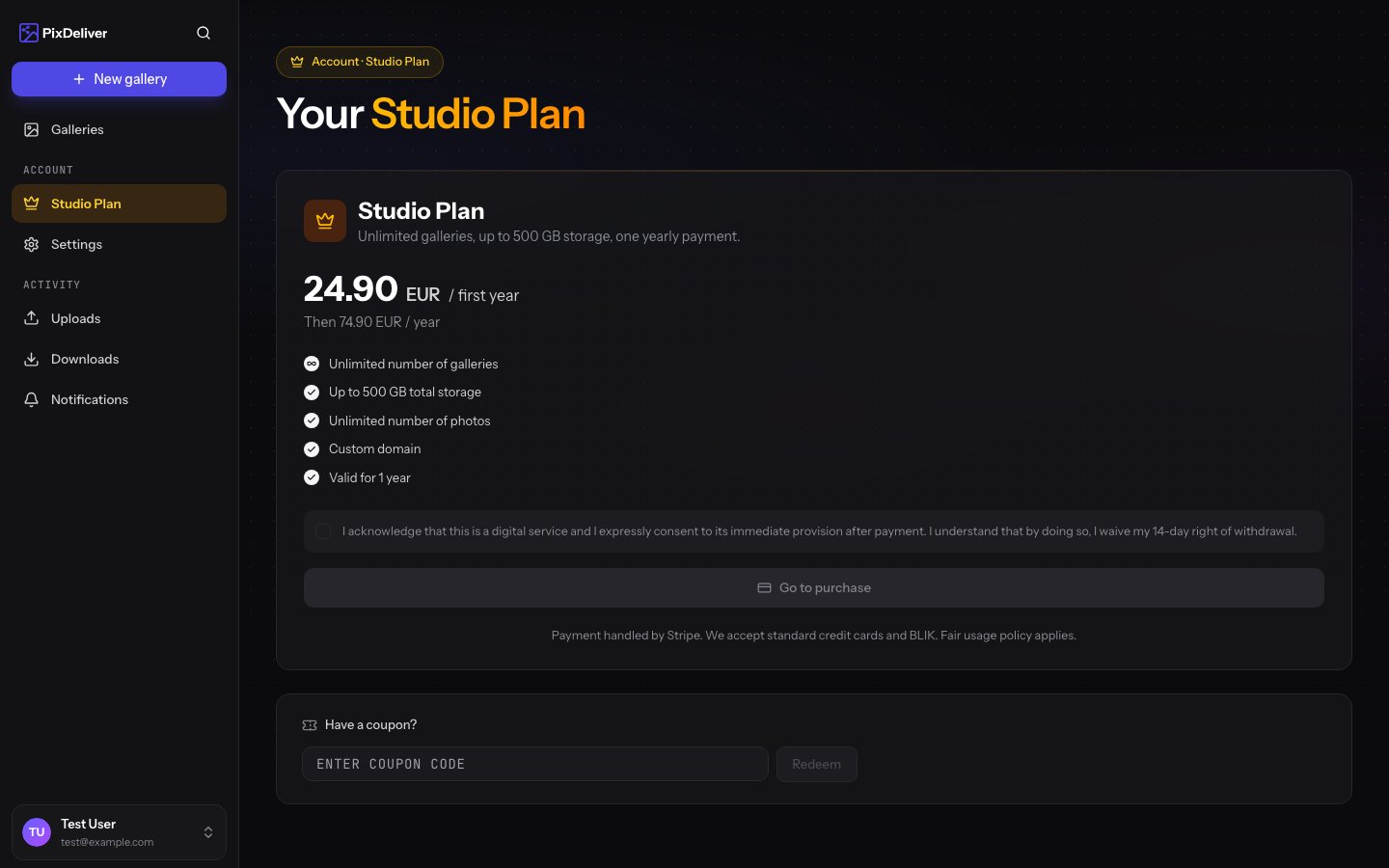
### When activating or renewing the Studio plan
**Instructions:**
1. Go to **Settings** → **Studio plan**
2. On the activation/renewal screen, find the **Coupon code** field
3. Enter the code and click **Apply**
4. The Studio plan price will be reduced by the value of the discount
5. Proceed to payment
Coupons issued for the Studio plan won't work when paying for a single gallery, and coupons for a per-gallery plan won't work on the Studio plan. The system will let you know if the code doesn't match the selected plan.
**Tips:**
* Copy and paste the code instead of retyping it (to avoid mistakes)
* Check the letter case (codes are case-sensitive)
***
## Coupon restrictions
### Single-use vs. multi-use
The system distinguishes between two kinds of coupons:
* **Single-use** — the first person to enter the code redeems it for the entire system. After that, the code is inactive.
* **Multi-use** — each user can redeem the code once. If you use such a code on the Studio plan or on a gallery, you won't be able to use it a second time on your account — but other users still can.
**Example of a multi-use coupon:**
* You have the promo code `RABAT3` (multi-use)
* You use it on the "Ania's Wedding" gallery
* When extending that gallery or on a new gallery on the same account, you **can't** use the same code again
* The code still works for other users
### Tied to a plan
Each coupon is issued for a specific plan:
* Small gallery plan
* Large gallery plan
* Studio plan
The code will only work when paying for the plan it was issued for. The system will let you know about a mismatch before payment.
### Coupons can't be combined
You can use only one coupon code per transaction:
* ❌ You can't apply two codes at once
* ✅ You can change the code before payment (remove the previous one, add a new one)
***
## Gifting a coupon code
Some codes can be gifted to other users (if they're multi-use).
**How to share a code:**
1. Copy the coupon code
2. Send it to a friend (email, messenger, WhatsApp)
3. Share the terms (expiration date, restrictions)
**Note:** Single-use coupons (e.g. gifts) may be tied to your account and won't always work for other users.
***
## Coupons in the newsletter
Sign up for the PixDeliver newsletter to receive exclusive discount codes:
**What you'll get:**
* Discount codes available only to subscribers
* Notifications about promotions
* Early access to new features
* Photography tips
* Case studies from other photographers
**How to sign up:**
1. Go to **Settings** → **Notifications**
2. Check **Newsletter**
3. Click **Save**
***
## Troubleshooting
**Problem:** The coupon code doesn't work. **Solution:**
1. Check the spelling - letter case matters
2. Make sure there are no spaces before/after the code
3. Check that the code hasn't expired
4. Check that you haven't already used it on this gallery
5. Make sure the code is valid for the selected plan
6. Try copying the code again from the source
7. Refresh the page and try again
**Problem:** I entered a code, but the discount didn't appear. **Solution:**
1. Click the **Apply** button (the code must be confirmed!)
2. Check the message - was the code accepted?
3. Refresh the page and enter the code again
**Problem:** The system says the code has expired. **Solution:**
* The code was only valid for a limited time
* Check the code's terms (expiration date)
* Look for newer codes (newsletter, social media)
* Contact the person who gave you the code
**Problem:** I used a code but paid the full price. **Solution:**
1. Check the payment confirmation email
2. See what amount was charged
3. If you paid the full price despite applying a code:
* Check whether the code was visible before payment
* Contact support with proof (a screenshot)
* Provide the transaction number
**Problem:** I want to use a code after paying for a gallery. **Solution:**
* Unfortunately, codes can't be applied after a payment is made
* Codes only work before paying/extending
* Remember to enter the code **before** proceeding to payment
***
## Frequently asked questions
**Can I use a code on a gallery that's already active?** No. Codes only work when paying for or extending a gallery (or activating/renewing the Studio plan).
**Can I use the same code on multiple galleries?** A multi-use coupon can be redeemed **once per account** — regardless of how many galleries you have. If you want to use a discount on another gallery, you need a different code.
**Does the letter case in the code matter?** Yes, codes are case-sensitive. `PHOTO20` is a different code from `photo20`. Copy the code exactly as you received it.
**How do I know a code is valid?** Codes should come with an expiration date. If you don't have that information, just try it — the system will tell you whether the code is active.
**Are discount codes available all the time?** Not all of them. Some codes are limited by time or quantity (e.g. the first 100 uses). Use codes right away!
**Does PixDeliver offer a referral program?** We don't currently have an official referral program. Check the latest information in the dashboard or on the homepage. Features may change.
***
## Related topics
* [Plans and pricing](/en/payments/plans-and-pricing) - See the available plans and how to pay for a gallery
* [Gallery renewal](/en/payments/gallery-renewal) - Use a code when extending
* [Studio plan](/en/payments/account-subscription) - Use a code when activating or renewing the Studio plan
## Overview
Coupon codes (discount codes) let you get a discount when paying for or extending a gallery in PixDeliver, as well as when activating or renewing the Studio plan. Coupons can offer a percentage discount, a fixed amount off, or even a free gallery.
**Key information:**
* Coupons are optional — you don't have to use them
* A coupon is **tied to a specific plan** (a per-gallery plan or the Studio plan) and only works with that plan
* Coupons come in two variants:
* **Single-use** — can only be redeemed once across the entire system
* **Multi-use** — each user can redeem it once (once per account)
* Coupons work both on the first payment and on extensions/renewals
* The letter case in the code matters
***
## Where do coupon codes come from?
Coupon codes can come from various sources, for example:
* The newsletter (sign up for the newsletter!)
* Promotional campaigns (e.g. Black Friday)
* Marketing campaigns
Follow PixDeliver and sign up for the newsletter to stay up to date with promotions and discount codes!
***
## Types of coupons
### Percentage discount
Reduces the price by a set percentage.
### Fixed-amount discount
Subtracts a fixed amount from the price.
### Free gallery
Offers a 100% discount (a chosen gallery type free for the first year).
***
## How to use a coupon code
### When paying for a gallery (per-gallery plan)
**Instructions:**
1. Go to pay for a gallery (Small or Large gallery)
2. Find the **Coupon code** field or **Have a discount code?**
3. Click to expand the field (if collapsed)
4. Enter the code exactly as you received it
* Letter case **matters**: `PHOTO20` ≠ `photo20`
5. Click **Apply** or **Use code**
6. You'll see the updated price with the discount
7. Proceed to payment
**Result:** The price will be reduced by the value of the discount. You'll pay less, or nothing at all (if the coupon gives a 100% discount).
### When activating or renewing the Studio plan
**Instructions:**
1. Go to **Settings** → **Studio plan**
2. On the activation/renewal screen, find the **Coupon code** field
3. Enter the code and click **Apply**
4. The Studio plan price will be reduced by the value of the discount
5. Proceed to payment
Coupons issued for the Studio plan won't work when paying for a single gallery, and coupons for a per-gallery plan won't work on the Studio plan. The system will let you know if the code doesn't match the selected plan.
**Tips:**
* Copy and paste the code instead of retyping it (to avoid mistakes)
* Check the letter case (codes are case-sensitive)
***
## Coupon restrictions
### Single-use vs. multi-use
The system distinguishes between two kinds of coupons:
* **Single-use** — the first person to enter the code redeems it for the entire system. After that, the code is inactive.
* **Multi-use** — each user can redeem the code once. If you use such a code on the Studio plan or on a gallery, you won't be able to use it a second time on your account — but other users still can.
**Example of a multi-use coupon:**
* You have the promo code `RABAT3` (multi-use)
* You use it on the "Ania's Wedding" gallery
* When extending that gallery or on a new gallery on the same account, you **can't** use the same code again
* The code still works for other users
### Tied to a plan
Each coupon is issued for a specific plan:
* Small gallery plan
* Large gallery plan
* Studio plan
The code will only work when paying for the plan it was issued for. The system will let you know about a mismatch before payment.
### Coupons can't be combined
You can use only one coupon code per transaction:
* ❌ You can't apply two codes at once
* ✅ You can change the code before payment (remove the previous one, add a new one)
***
## Gifting a coupon code
Some codes can be gifted to other users (if they're multi-use).
**How to share a code:**
1. Copy the coupon code
2. Send it to a friend (email, messenger, WhatsApp)
3. Share the terms (expiration date, restrictions)
**Note:** Single-use coupons (e.g. gifts) may be tied to your account and won't always work for other users.
***
## Coupons in the newsletter
Sign up for the PixDeliver newsletter to receive exclusive discount codes:
**What you'll get:**
* Discount codes available only to subscribers
* Notifications about promotions
* Early access to new features
* Photography tips
* Case studies from other photographers
**How to sign up:**
1. Go to **Settings** → **Notifications**
2. Check **Newsletter**
3. Click **Save**
***
## Troubleshooting
**Problem:** The coupon code doesn't work. **Solution:**
1. Check the spelling - letter case matters
2. Make sure there are no spaces before/after the code
3. Check that the code hasn't expired
4. Check that you haven't already used it on this gallery
5. Make sure the code is valid for the selected plan
6. Try copying the code again from the source
7. Refresh the page and try again
**Problem:** I entered a code, but the discount didn't appear. **Solution:**
1. Click the **Apply** button (the code must be confirmed!)
2. Check the message - was the code accepted?
3. Refresh the page and enter the code again
**Problem:** The system says the code has expired. **Solution:**
* The code was only valid for a limited time
* Check the code's terms (expiration date)
* Look for newer codes (newsletter, social media)
* Contact the person who gave you the code
**Problem:** I used a code but paid the full price. **Solution:**
1. Check the payment confirmation email
2. See what amount was charged
3. If you paid the full price despite applying a code:
* Check whether the code was visible before payment
* Contact support with proof (a screenshot)
* Provide the transaction number
**Problem:** I want to use a code after paying for a gallery. **Solution:**
* Unfortunately, codes can't be applied after a payment is made
* Codes only work before paying/extending
* Remember to enter the code **before** proceeding to payment
***
## Frequently asked questions
**Can I use a code on a gallery that's already active?** No. Codes only work when paying for or extending a gallery (or activating/renewing the Studio plan).
**Can I use the same code on multiple galleries?** A multi-use coupon can be redeemed **once per account** — regardless of how many galleries you have. If you want to use a discount on another gallery, you need a different code.
**Does the letter case in the code matter?** Yes, codes are case-sensitive. `PHOTO20` is a different code from `photo20`. Copy the code exactly as you received it.
**How do I know a code is valid?** Codes should come with an expiration date. If you don't have that information, just try it — the system will tell you whether the code is active.
**Are discount codes available all the time?** Not all of them. Some codes are limited by time or quantity (e.g. the first 100 uses). Use codes right away!
**Does PixDeliver offer a referral program?** We don't currently have an official referral program. Check the latest information in the dashboard or on the homepage. Features may change.
***
## Related topics
* [Plans and pricing](/en/payments/plans-and-pricing) - See the available plans and how to pay for a gallery
* [Gallery renewal](/en/payments/gallery-renewal) - Use a code when extending
* [Studio plan](/en/payments/account-subscription) - Use a code when activating or renewing the Studio plan