> ## Documentation Index
> Fetch the complete documentation index at: https://docs.pixdeliver.com/llms.txt
> Use this file to discover all available pages before exploring further.
# Gallery renewal
> Learn how to extend a gallery's validity after a year has passed
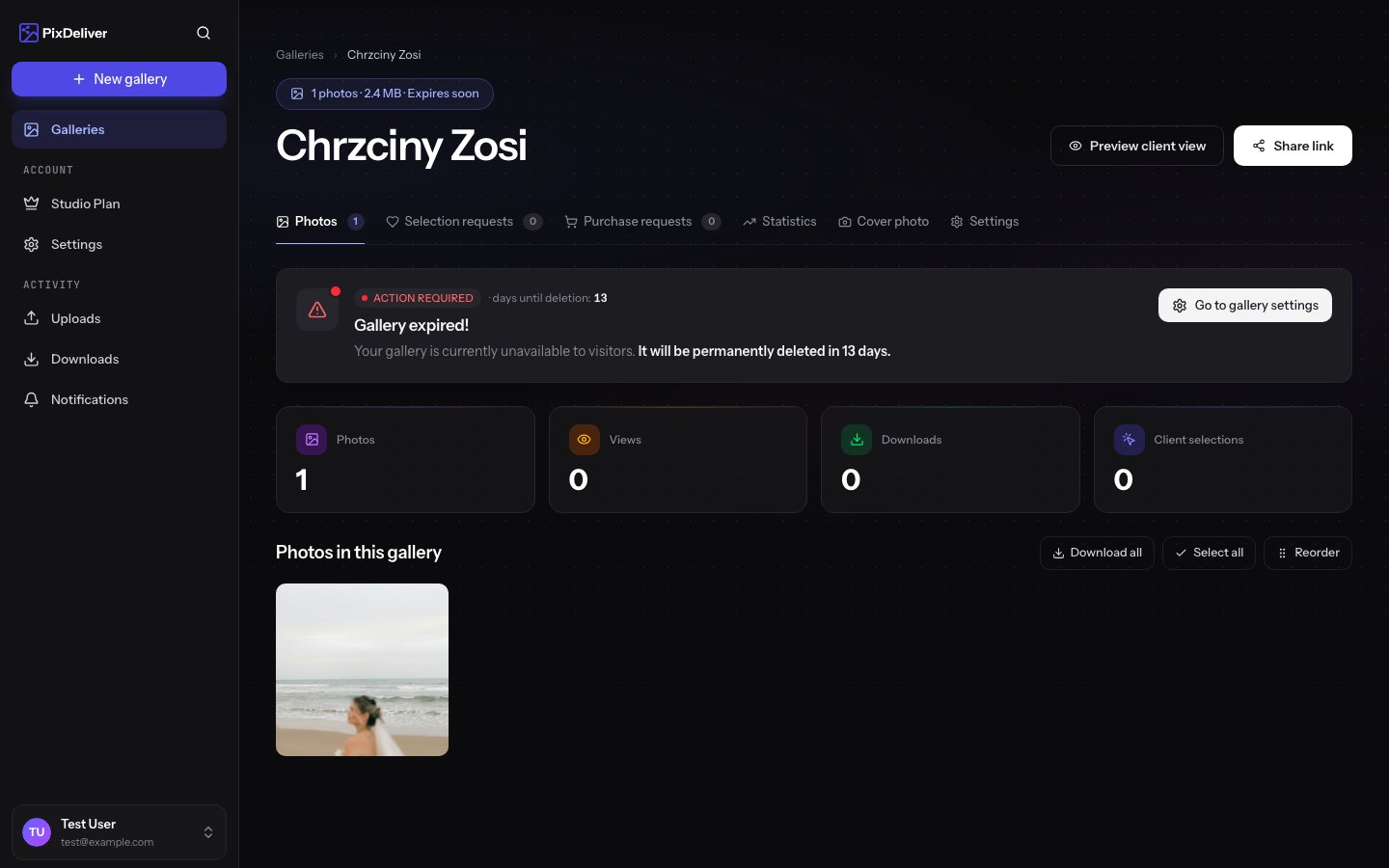 ## Overview
Every gallery in PixDeliver paid for with a per-gallery plan is valid for 1 year from the payment date. After that time, the gallery expires and is no longer publicly available. You can, however, easily extend a gallery's validity by paying for another year.
**Key information:**
* A gallery with a per-gallery plan is valid for 365 days from the payment date
* You'll receive email notifications before expiration
* You can extend a gallery within the 30 days before expiration window
* After expiration you have a 14-day grace period to renew
* After 14 days the gallery is permanently deleted along with its photos
Galleries covered by an active **Studio plan** do not need a separate per-gallery renewal — they're paid for at the account level. See: [Studio plan](/en/payments/account-subscription).
***
## Notification schedule
The system automatically sends email notifications about an upcoming expiration:
### 30 days before expiration
**Subject:** "Your gallery expires in a month"
**Content:**
* Gallery name
* Expiration date
* Extension link
* A reminder about the extension feature
**What you can do:**
* Extend the gallery ahead of time
* Keep the gallery active without any break in access
### 7 days before expiration
**Subject:** "Reminder: your gallery expires in a week"
**Content:**
* An urgent reminder
* Expiration date
* Extension link
* Information about the consequences of expiration
**What you can do:**
* Extend the gallery now
* Or plan the extension in the coming days
### On the expiration date
**Subject:** "Your gallery has expired"
**Content:**
* Information about the expiration
* The gallery is no longer publicly available
* Renewal link
* 14-day grace period before deletion
**What happens:**
* The gallery becomes unavailable to clients
* Clients opening the link see a page informing them that the gallery has expired
* Photos remain safe on the server during the grace period
* You have 14 days to renew
### 14 days after expiration
**Subject:** "Last reminder - the gallery will be deleted"
**Content:**
* A final warning
* The gallery will be permanently deleted soon
* Renewal link (last chance)
* A reminder to download the photos
**What you can do:**
* Renew the gallery now (last chance!)
* Or download all photos before deletion
After the grace period ends (14 days after expiration), the gallery and all photos will be **permanently deleted** from the server, with no way to recover them.
***
## Extending a gallery
### Extending before expiration
You can extend a gallery up to 30 days before the expiration date.
**Instructions:**
1. Sign in to PixDeliver
2. Go to the **Dashboard**
3. Find the gallery approaching expiration
4. You'll see a label: "Expires in X days"
5. Click **Extend gallery**, or open the gallery and click the extension button
6. Choose a plan (the same as before, or a different one)
7. Proceed to payment (Stripe)
8. Pay for the extension
**Result:**
* The expiration date is extended by 365 days from the **current expiration date**
* The gallery stays active without any break
* Clients won't notice any difference
**Example:**
* Current expiration date: June 15, 2025
* You extend on May 20, 2025 (26 days earlier)
* New expiration date: June 15, 2026
**You don't lose the remaining days!** The extension adds a year to the current expiration date.
***
### Renewing after expiration
If a gallery has already expired, you can renew it within 14 days.
**Instructions:**
1. Sign in to PixDeliver
2. Go to the **Dashboard**
3. Find the gallery with the **Expired** status
4. Click **Renew gallery**
5. Choose a plan
6. Proceed to payment
7. Pay for the renewal
**Result:**
* The gallery is reactivated
* The status changes to **Active**
* New expiration date: 365 days from the renewal date
* The gallery is publicly available again
* The link works normally
**Note:** When renewing after expiration, the new year counts **from the renewal date**, not from the old expiration date. The days after expiration (while the gallery was unavailable) are not added.
**Example:**
* Gallery expired: June 15, 2025
* You renew: June 20, 2025 (5 days after expiration)
* New expiration date: June 20, 2026
***
## Changing the plan when extending
You can change the plan while extending a gallery.
### From Small to Large gallery
**When to do this:**
* You want to add more photos
* You're approaching the 3 GB limit
* You'd rather have more freedom
**Instructions:**
1. While extending, choose the **Large gallery - 15 PLN** plan
2. Pay for the extension
3. From now on you have unlimited storage
### From Large to Small gallery
**When to do this:**
* The gallery is under 3 GB
* You want to save 6 PLN
* You don't plan to add more photos
**Instructions:**
1. **FIRST** make sure the gallery is under 3 GB
2. Check the size in the gallery settings
3. If it exceeds 3 GB, delete some photos
4. While extending, choose the **Small gallery - 9 PLN** plan
5. Pay for the extension
The system **will not let you** choose the Small gallery plan if the gallery's current size exceeds 3 GB.
***
## Extension prices
Extension prices are the same as the first payment:
* **Small gallery plan:** 9 PLN/year
* **Large gallery plan:** 15 PLN/year
**No discounts for long-time users?**
We don't currently offer discounts for extensions. Prices are identical to the first payment for a gallery. However, you can use coupon codes if you have any.
***
## Using coupon codes when extending
If you have a coupon code, you can use it when extending a gallery too.
**Instructions:**
1. Start the extension process
2. Choose a plan
3. In the **Coupon code** field, enter the code
4. Click **Apply**
5. The price will be updated
6. Proceed to payment
Coupon codes can be single-use or multi-use — it depends on the code's settings. Check the terms of your code.
***
## What happens to a gallery after expiration?
### Immediately after expiration
**What stops working:**
* ❌ Public access to the gallery — clients see a "Gallery expired" page
* ❌ Ability for clients to browse
* ❌ Ability for clients to download photos
* ❌ Photo selection forms
* ❌ Collecting new statistics
**What still works:**
* ✅ Access to the gallery in the management dashboard (for you)
* ✅ Ability to browse photos in the dashboard
* ✅ Ability to download all photos
* ✅ Ability to renew the gallery
* ✅ Historical statistics (preserved)
### During the grace period (14 days)
**What you can do:**
* Renew the gallery (reactivates it immediately)
* Download all photos
* Browse the gallery in the management dashboard
* Check statistics
**What you can't do:**
* Share the gallery with clients (the link doesn't work)
* Collect new statistics
* Receive new selections from clients
### After the grace period ends
**What happens:**
* 🗑️ The gallery is permanently deleted
* 🗑️ All photos are deleted (originals, thumbnails, compressed versions)
* 🗑️ Statistics are deleted
* 🗑️ Photo selections are deleted
* 🗑️ **No way to recover the data**
***
## Downloading photos before deletion
If you don't plan to extend a gallery, download the photos before deletion.
**Instructions:**
1. Open the expired gallery in the management dashboard
2. Go to **Gallery settings**
3. In the **Export** section, click **Download all photos**
4. Choose a version:
* **Originals** - files exactly as uploaded
* **Compressed** - WebP 3840×3840
5. Click **Generate ZIP archive**
6. Wait for it to be generated
7. Download the ZIP archive
**Result:** You have a backup of all the photos from the gallery.
The ZIP archive is valid for 2 hours. Download it right after it's generated!
***
## Automatic deletion
The system automatically deletes galleries that:
* Expired more than 14 days ago
* Were not renewed during the grace period
* Are flagged for deletion
**Deletion process:**
1. Day 15 after expiration - the gallery enters the deletion queue
2. Within 24-48 hours - the gallery is permanently deleted
3. An email confirming deletion (if notifications are enabled)
Automatic deletion is irreversible. Make sure you've downloaded all the photos you need before the grace period ends!
***
## Tips and best practices
✅ **Recommended:**
* Extend galleries ahead of time (30 days before expiration)
* Enable email notifications about expiring galleries
* Set reminders in your calendar (e.g. 1 month before)
* Regularly check the Dashboard for approaching dates
* Download backups of important galleries
* Consider which galleries you really need to extend
* Use the extension option in the email (more convenient)
❌ **Avoid:**
* Waiting until the last day (you might forget!)
* Ignoring emails about expiring galleries
* Assuming a gallery will extend automatically (it won't!)
* Leaving important galleries without an extension
* Deleting galleries before downloading the photos
***
## Troubleshooting
**Problem:** I'm not receiving notifications about expiring galleries
**Solution:**
1. Check **Settings** → **Notifications**
2. Make sure the "Upcoming gallery expiration" option is enabled
3. Check the SPAM folder in your inbox
4. Add [noreply@pixdeliver.com](mailto:noreply@pixdeliver.com) to your trusted senders
5. Check that the email in your profile is correct
**Problem:** The gallery expired and I didn't get a notification
**Solution:**
1. Check the SPAM folder (notifications may have landed there)
2. Check your notification settings
3. If you don't renew within 14 days, the gallery will be deleted
4. Renew the gallery now, if you still can
**Problem:** I want to extend a gallery but I can't choose the Small gallery plan
**Solution:**
* Your gallery exceeds 3 GB
* Check the gallery size in the settings
* Delete some photos to fit within 3 GB
* Or choose the Large gallery plan (15 PLN)
**Problem:** After extending, the gallery still shows as expired
**Solution:**
1. Refresh the page (Ctrl+F5)
2. Sign out and sign back in
3. Wait 1-2 minutes for the system to update
4. Check your email - did you receive a payment confirmation?
5. If the payment went through and the gallery is still expired, contact support
**Problem:** The gallery was deleted and I want to recover it
**Solution:**
* Unfortunately, deletion is irreversible
* Photos cannot be recovered from the server
* The only option: upload the photos again from a backup
* For the future: download backups before expiration!
***
## Frequently asked questions
**Can I extend a gallery for longer than a year?**
Not currently. The maximum extension period is 1 year. After a year you can extend again.
**Is the extension price the same every year?**
Prices may change. The current extension price is the same as for new galleries (9 or 15 PLN). Any increases are announced in advance.
**Do I lose the remaining days if I extend early?**
No! If you extend before expiration, a year is added to the current expiration date, so you don't lose a single day.
**Does a gallery extend automatically?**
No. You have to extend each gallery manually. There is no automatic renewal option.
**What if I extend a gallery 10 days after expiration?**
The gallery will be reactivated, but the new year counts from the day of extension (not from the old expiration date). You lose those 10 days.
**Can I cancel an extension and get a refund?**
No. After paying for an extension, the payment is non-refundable, and the gallery is active for another year.
***
## Galleries covered by the Studio plan
If a gallery is covered by an active **Studio plan**, a per-gallery renewal is not required — the Studio plan covers all galleries together.
**Expiration rule:** a gallery stays active until the **later of the two dates**:
* The expiration date of its own per-gallery plan (if it was ever paid for)
* The expiration date of the Studio plan
**What this means in practice:**
* After a per-gallery plan expires, but with an active Studio plan — the gallery keeps working without a break
* After the Studio plan expires, but with an active per-gallery plan — the gallery keeps working until the end of its own annual period
* After **both** terms expire — the gallery enters a 14-day grace period, after which it is permanently deleted
In the gallery panel, with an active Studio plan, the per-gallery extension button is disabled — renewal happens only at the account level: [Studio plan](/en/payments/account-subscription).
***
## Related topics
* [Plans and pricing](/en/payments/plans-and-pricing) - Plan details, prices, and how to pay for an extension
* [Studio plan](/en/payments/account-subscription) - Covering all galleries with a single Studio plan
* [Coupon codes](/en/payments/coupon-codes) - Use a code when extending
* [Gallery settings](/en/managing-galleries/gallery-settings) - Managing a gallery
## Overview
Every gallery in PixDeliver paid for with a per-gallery plan is valid for 1 year from the payment date. After that time, the gallery expires and is no longer publicly available. You can, however, easily extend a gallery's validity by paying for another year.
**Key information:**
* A gallery with a per-gallery plan is valid for 365 days from the payment date
* You'll receive email notifications before expiration
* You can extend a gallery within the 30 days before expiration window
* After expiration you have a 14-day grace period to renew
* After 14 days the gallery is permanently deleted along with its photos
Galleries covered by an active **Studio plan** do not need a separate per-gallery renewal — they're paid for at the account level. See: [Studio plan](/en/payments/account-subscription).
***
## Notification schedule
The system automatically sends email notifications about an upcoming expiration:
### 30 days before expiration
**Subject:** "Your gallery expires in a month"
**Content:**
* Gallery name
* Expiration date
* Extension link
* A reminder about the extension feature
**What you can do:**
* Extend the gallery ahead of time
* Keep the gallery active without any break in access
### 7 days before expiration
**Subject:** "Reminder: your gallery expires in a week"
**Content:**
* An urgent reminder
* Expiration date
* Extension link
* Information about the consequences of expiration
**What you can do:**
* Extend the gallery now
* Or plan the extension in the coming days
### On the expiration date
**Subject:** "Your gallery has expired"
**Content:**
* Information about the expiration
* The gallery is no longer publicly available
* Renewal link
* 14-day grace period before deletion
**What happens:**
* The gallery becomes unavailable to clients
* Clients opening the link see a page informing them that the gallery has expired
* Photos remain safe on the server during the grace period
* You have 14 days to renew
### 14 days after expiration
**Subject:** "Last reminder - the gallery will be deleted"
**Content:**
* A final warning
* The gallery will be permanently deleted soon
* Renewal link (last chance)
* A reminder to download the photos
**What you can do:**
* Renew the gallery now (last chance!)
* Or download all photos before deletion
After the grace period ends (14 days after expiration), the gallery and all photos will be **permanently deleted** from the server, with no way to recover them.
***
## Extending a gallery
### Extending before expiration
You can extend a gallery up to 30 days before the expiration date.
**Instructions:**
1. Sign in to PixDeliver
2. Go to the **Dashboard**
3. Find the gallery approaching expiration
4. You'll see a label: "Expires in X days"
5. Click **Extend gallery**, or open the gallery and click the extension button
6. Choose a plan (the same as before, or a different one)
7. Proceed to payment (Stripe)
8. Pay for the extension
**Result:**
* The expiration date is extended by 365 days from the **current expiration date**
* The gallery stays active without any break
* Clients won't notice any difference
**Example:**
* Current expiration date: June 15, 2025
* You extend on May 20, 2025 (26 days earlier)
* New expiration date: June 15, 2026
**You don't lose the remaining days!** The extension adds a year to the current expiration date.
***
### Renewing after expiration
If a gallery has already expired, you can renew it within 14 days.
**Instructions:**
1. Sign in to PixDeliver
2. Go to the **Dashboard**
3. Find the gallery with the **Expired** status
4. Click **Renew gallery**
5. Choose a plan
6. Proceed to payment
7. Pay for the renewal
**Result:**
* The gallery is reactivated
* The status changes to **Active**
* New expiration date: 365 days from the renewal date
* The gallery is publicly available again
* The link works normally
**Note:** When renewing after expiration, the new year counts **from the renewal date**, not from the old expiration date. The days after expiration (while the gallery was unavailable) are not added.
**Example:**
* Gallery expired: June 15, 2025
* You renew: June 20, 2025 (5 days after expiration)
* New expiration date: June 20, 2026
***
## Changing the plan when extending
You can change the plan while extending a gallery.
### From Small to Large gallery
**When to do this:**
* You want to add more photos
* You're approaching the 3 GB limit
* You'd rather have more freedom
**Instructions:**
1. While extending, choose the **Large gallery - 15 PLN** plan
2. Pay for the extension
3. From now on you have unlimited storage
### From Large to Small gallery
**When to do this:**
* The gallery is under 3 GB
* You want to save 6 PLN
* You don't plan to add more photos
**Instructions:**
1. **FIRST** make sure the gallery is under 3 GB
2. Check the size in the gallery settings
3. If it exceeds 3 GB, delete some photos
4. While extending, choose the **Small gallery - 9 PLN** plan
5. Pay for the extension
The system **will not let you** choose the Small gallery plan if the gallery's current size exceeds 3 GB.
***
## Extension prices
Extension prices are the same as the first payment:
* **Small gallery plan:** 9 PLN/year
* **Large gallery plan:** 15 PLN/year
**No discounts for long-time users?**
We don't currently offer discounts for extensions. Prices are identical to the first payment for a gallery. However, you can use coupon codes if you have any.
***
## Using coupon codes when extending
If you have a coupon code, you can use it when extending a gallery too.
**Instructions:**
1. Start the extension process
2. Choose a plan
3. In the **Coupon code** field, enter the code
4. Click **Apply**
5. The price will be updated
6. Proceed to payment
Coupon codes can be single-use or multi-use — it depends on the code's settings. Check the terms of your code.
***
## What happens to a gallery after expiration?
### Immediately after expiration
**What stops working:**
* ❌ Public access to the gallery — clients see a "Gallery expired" page
* ❌ Ability for clients to browse
* ❌ Ability for clients to download photos
* ❌ Photo selection forms
* ❌ Collecting new statistics
**What still works:**
* ✅ Access to the gallery in the management dashboard (for you)
* ✅ Ability to browse photos in the dashboard
* ✅ Ability to download all photos
* ✅ Ability to renew the gallery
* ✅ Historical statistics (preserved)
### During the grace period (14 days)
**What you can do:**
* Renew the gallery (reactivates it immediately)
* Download all photos
* Browse the gallery in the management dashboard
* Check statistics
**What you can't do:**
* Share the gallery with clients (the link doesn't work)
* Collect new statistics
* Receive new selections from clients
### After the grace period ends
**What happens:**
* 🗑️ The gallery is permanently deleted
* 🗑️ All photos are deleted (originals, thumbnails, compressed versions)
* 🗑️ Statistics are deleted
* 🗑️ Photo selections are deleted
* 🗑️ **No way to recover the data**
***
## Downloading photos before deletion
If you don't plan to extend a gallery, download the photos before deletion.
**Instructions:**
1. Open the expired gallery in the management dashboard
2. Go to **Gallery settings**
3. In the **Export** section, click **Download all photos**
4. Choose a version:
* **Originals** - files exactly as uploaded
* **Compressed** - WebP 3840×3840
5. Click **Generate ZIP archive**
6. Wait for it to be generated
7. Download the ZIP archive
**Result:** You have a backup of all the photos from the gallery.
The ZIP archive is valid for 2 hours. Download it right after it's generated!
***
## Automatic deletion
The system automatically deletes galleries that:
* Expired more than 14 days ago
* Were not renewed during the grace period
* Are flagged for deletion
**Deletion process:**
1. Day 15 after expiration - the gallery enters the deletion queue
2. Within 24-48 hours - the gallery is permanently deleted
3. An email confirming deletion (if notifications are enabled)
Automatic deletion is irreversible. Make sure you've downloaded all the photos you need before the grace period ends!
***
## Tips and best practices
✅ **Recommended:**
* Extend galleries ahead of time (30 days before expiration)
* Enable email notifications about expiring galleries
* Set reminders in your calendar (e.g. 1 month before)
* Regularly check the Dashboard for approaching dates
* Download backups of important galleries
* Consider which galleries you really need to extend
* Use the extension option in the email (more convenient)
❌ **Avoid:**
* Waiting until the last day (you might forget!)
* Ignoring emails about expiring galleries
* Assuming a gallery will extend automatically (it won't!)
* Leaving important galleries without an extension
* Deleting galleries before downloading the photos
***
## Troubleshooting
**Problem:** I'm not receiving notifications about expiring galleries
**Solution:**
1. Check **Settings** → **Notifications**
2. Make sure the "Upcoming gallery expiration" option is enabled
3. Check the SPAM folder in your inbox
4. Add [noreply@pixdeliver.com](mailto:noreply@pixdeliver.com) to your trusted senders
5. Check that the email in your profile is correct
**Problem:** The gallery expired and I didn't get a notification
**Solution:**
1. Check the SPAM folder (notifications may have landed there)
2. Check your notification settings
3. If you don't renew within 14 days, the gallery will be deleted
4. Renew the gallery now, if you still can
**Problem:** I want to extend a gallery but I can't choose the Small gallery plan
**Solution:**
* Your gallery exceeds 3 GB
* Check the gallery size in the settings
* Delete some photos to fit within 3 GB
* Or choose the Large gallery plan (15 PLN)
**Problem:** After extending, the gallery still shows as expired
**Solution:**
1. Refresh the page (Ctrl+F5)
2. Sign out and sign back in
3. Wait 1-2 minutes for the system to update
4. Check your email - did you receive a payment confirmation?
5. If the payment went through and the gallery is still expired, contact support
**Problem:** The gallery was deleted and I want to recover it
**Solution:**
* Unfortunately, deletion is irreversible
* Photos cannot be recovered from the server
* The only option: upload the photos again from a backup
* For the future: download backups before expiration!
***
## Frequently asked questions
**Can I extend a gallery for longer than a year?**
Not currently. The maximum extension period is 1 year. After a year you can extend again.
**Is the extension price the same every year?**
Prices may change. The current extension price is the same as for new galleries (9 or 15 PLN). Any increases are announced in advance.
**Do I lose the remaining days if I extend early?**
No! If you extend before expiration, a year is added to the current expiration date, so you don't lose a single day.
**Does a gallery extend automatically?**
No. You have to extend each gallery manually. There is no automatic renewal option.
**What if I extend a gallery 10 days after expiration?**
The gallery will be reactivated, but the new year counts from the day of extension (not from the old expiration date). You lose those 10 days.
**Can I cancel an extension and get a refund?**
No. After paying for an extension, the payment is non-refundable, and the gallery is active for another year.
***
## Galleries covered by the Studio plan
If a gallery is covered by an active **Studio plan**, a per-gallery renewal is not required — the Studio plan covers all galleries together.
**Expiration rule:** a gallery stays active until the **later of the two dates**:
* The expiration date of its own per-gallery plan (if it was ever paid for)
* The expiration date of the Studio plan
**What this means in practice:**
* After a per-gallery plan expires, but with an active Studio plan — the gallery keeps working without a break
* After the Studio plan expires, but with an active per-gallery plan — the gallery keeps working until the end of its own annual period
* After **both** terms expire — the gallery enters a 14-day grace period, after which it is permanently deleted
In the gallery panel, with an active Studio plan, the per-gallery extension button is disabled — renewal happens only at the account level: [Studio plan](/en/payments/account-subscription).
***
## Related topics
* [Plans and pricing](/en/payments/plans-and-pricing) - Plan details, prices, and how to pay for an extension
* [Studio plan](/en/payments/account-subscription) - Covering all galleries with a single Studio plan
* [Coupon codes](/en/payments/coupon-codes) - Use a code when extending
* [Gallery settings](/en/managing-galleries/gallery-settings) - Managing a gallery