> ## Documentation Index
> Fetch the complete documentation index at: https://docs.pixdeliver.com/llms.txt
> Use this file to discover all available pages before exploring further.
# Password protection
> Learn how to secure galleries with a password for greater privacy
 ## Overview
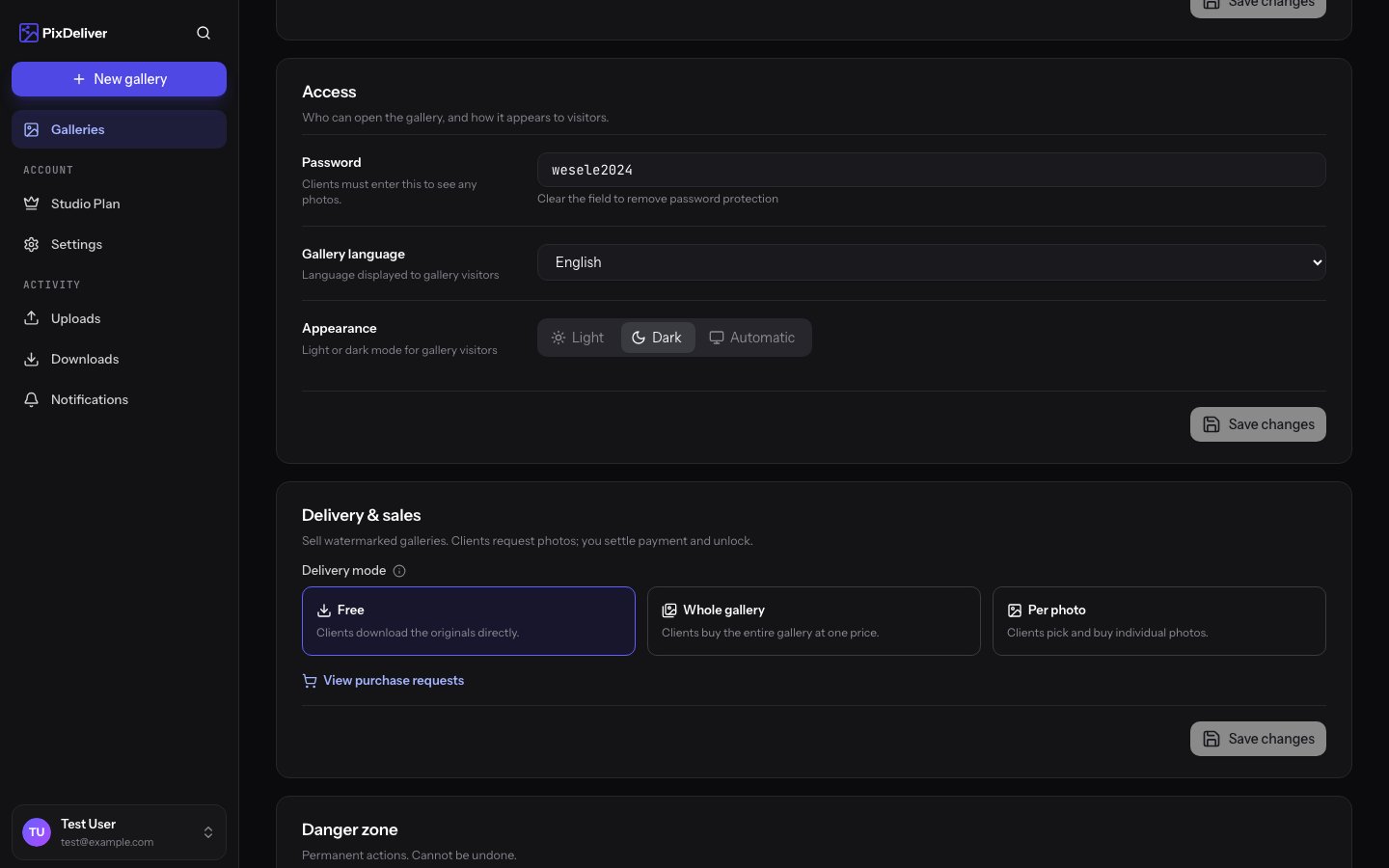
Password protection is an extra layer of security for galleries. When a gallery is password-protected, anyone who wants to view it must first enter the correct password. This is an ideal solution for sessions that require more privacy.
**Key information:**
* A password can be added when creating a gallery or later
* You can change or remove the password at any time
* One password for the whole gallery (you cannot set different passwords for different people)
* Clients only have to enter the password once (it is remembered in the browser)
***
## When to use password protection?
### ✅ Recommended for:
**Intimate and sensitive sessions:**
* Boudoir sessions
* Maternity sessions
* Artistic nude sessions
* Private personal sessions
**Private events:**
* Weddings (access for guests only)
* Birthday parties
* Christenings, communions
* Family events
**Business and confidential photos:**
* Corporate sessions (before publication)
* Projects in progress
* Photos containing sensitive data
* Client preview (before final approval)
**Test galleries:**
* Temporary galleries for approval
* Showcase galleries for selected clients
* Galleries for photo selection
### ❌ Not needed for:
* Open-access outdoor sessions
* Event photos intended for publication
* Galleries that should be easily accessible to a wide group
* When you care about maximum convenience for clients
**The trade-off:** A password increases security but requires an extra step from clients. Consider whether the added privacy is worth the small inconvenience.
***
## Adding a password to a gallery
### While creating a gallery
**Instructions:**
1. While creating a new gallery, select the **Protect the gallery with a password** option
2. In the **Password** field, enter your chosen password
3. Confirm the password in the **Confirm password** field
4. Click **Create gallery**
**Result:** The gallery will be created with password protection.
***
### To an existing gallery
You can add a password to a gallery that already exists.
**Instructions:**
1. Open the gallery in the management panel
2. Go to **Gallery settings**
3. Find the **Security** section
4. Select **Protect the gallery with a password**
5. Enter the password
6. Confirm the password
7. Click **Save changes**
**Result:** From now on, the gallery requires a password. Everyone with the link will have to enter it.
**If the gallery was already shared:** After adding a password, you must inform all clients about the new password!
***
## Changing the password
You can change the gallery password at any time.
**Instructions:**
1. Go to **Gallery settings**
2. In the **Security** section, you will see the current password
3. Enter a new password in the **Password** field
4. Confirm the new password
5. Click **Save changes**
**Result:**
* The old password stops working immediately
* Clients must use the new password
* People who have already opened the gallery must enter the password again the next time they open it
After changing the password:
* All clients must know the new password
* Send the new password to everyone who has access to the gallery
* The old password stops working right after you save the changes
***
## Removing the password
If you want to make the gallery publicly accessible (without a password):
**Instructions:**
1. Go to **Gallery settings**
2. In the **Security** section, deselect **Protect the gallery with a password**
3. Click **Save changes**
**Result:** The gallery becomes accessible without a password. Anyone with the link can open it.
***
## Password requirements
### Length and characters
* **Minimum:** 4 characters
* **Maximum:** 50 characters
* **Allowed:** Letters (Polish characters are OK), digits, special characters, spaces
* **Case:** Matters (`Haslo123` ≠ `haslo123`)
### Password examples
**Weak passwords (DO NOT use):**
* ❌ `1234` - too simple
* ❌ `haslo` - too obvious
* ❌ `password` - commonly used
* ❌ `ania` - too short, easy to guess
**Good passwords:**
* ✅ `wesele2024ania` - long, descriptive
* ✅ `SesjaRodzinna!2024` - upper/lowercase, special character
* ✅ `MojePierwszeWesele` - easy to remember, hard to guess
* ✅ `MalgosiaDziecko&2024` - a combination of words and characters
**Very good passwords (for maximum security):**
* ✅ `x9Kp#mWq2@aL` - random characters (generate them in a password manager)
* ✅ `SesjaIntymna!Kasi2024#prywatne` - long, with various elements
**Balance:** A password should be:
* Strong enough to protect privacy
* Simple enough for clients to remember or type
* For most galleries, a password like `weseleania2024` or `rodzinakowalskich` is enough
***
## How to share the password with clients
### In the same message as the link
**The most common method:**
```
Hi Ania!
Your photos are ready!
Link: https://foto-jan.pixdeliver.com/sesja-ania
Password: ania2024
Best regards!
```
### Separately (for greater security)
**Email with the link:**
```
Subject: Link to your photos
Hi Ania!
Gallery link:
https://foto-jan.pixdeliver.com/sesja-ania
I will send the password in a separate message.
Best regards!
```
**SMS with the password:**
```
Gallery password: ania2024
```
**Why separately?**
* Greater security (different communication channels)
* Even if someone intercepts one channel, they will not have full access
* Recommended for very sensitive sessions
### Phone (highest security)
For extremely private sessions:
1. Send the link by email/SMS
2. Share the password over the phone
3. Do not save the password in any electronic form (the client should not either)
***
## How clients use the password
### Opening the gallery for the first time
1. The client clicks the gallery link
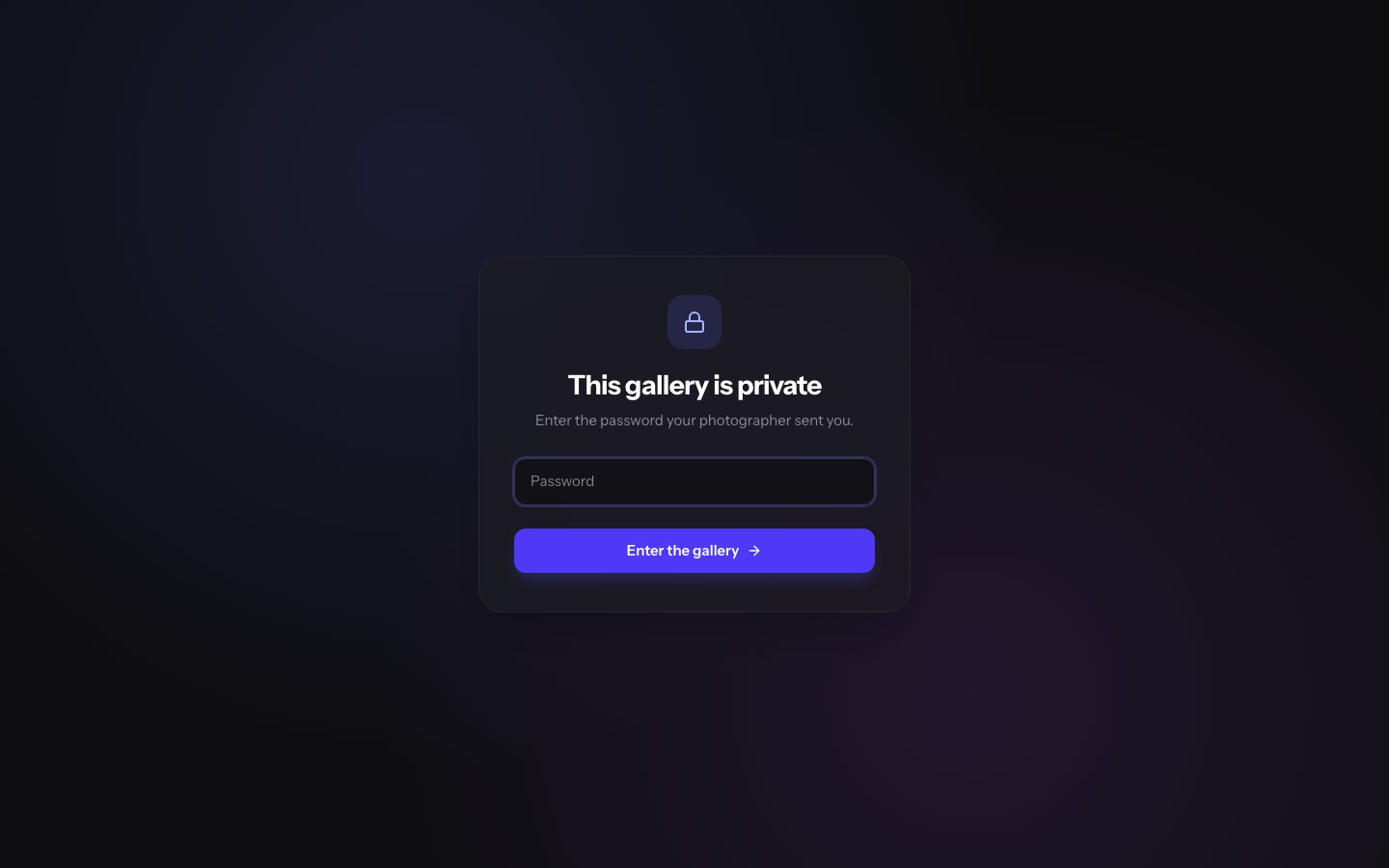
2. They see a screen with a password form:
```
This gallery is password-protected
[Field to enter the password]
[Button: Open gallery]
```
3. The client enters the password
4. They click **Open gallery**
5. If the password is correct - the gallery opens
6. If it is wrong - they see an error message
### Remembering the password
After entering the correct password:
* The browser remembers the password
* The client does not have to enter it again in the same browser
* The password is valid until the browser is closed or the cache is cleared
**What this means for the client:**
* The password is entered **only once**
* On subsequent visits, the gallery opens automatically (in the same browser)
* On another device, they must enter the password again
***
## What happens with a wrong password
### After entering a wrong password
The client sees a message:
```
❌ Incorrect password
Try again or contact the photographer.
```
**This could be caused by:**
* A typo in the password
* Mixed-up letter case (`Haslo` vs `haslo`)
* Spaces at the start/end of the password
* Copying the password with an extra character
* The photographer changed the password
### No attempt limit
The system does not block access after wrong attempts:
* The client can try entering the password multiple times
* There is no risk of "locking out" the gallery
* Encourage clients to copy the password (instead of retyping it)
***
## Managing passwords for multiple galleries
### Password strategies
**Option 1: A unique password for each gallery**
✅ Pros:
* Maximum security
* If one password leaks, the other galleries are safe
* You can use descriptive passwords (e.g. `weseleniemiec2024`, `sesjamaja2024`)
❌ Cons:
* Harder to manage
* You have to remember many passwords
* Clients may mix up passwords for different galleries
**Option 2: One password for all galleries of a single client**
✅ Pros:
* Easy for the client to remember
* Simpler communication
* The client can access multiple galleries with the same password
❌ Cons:
* Less security
* If the password leaks, all galleries are at risk
**Option 3: Passwords by category (e.g. weddings, families, business)**
A compromise between security and convenience.
**Recommendation:** For most photographers, a unique password for each gallery is best. Use the pattern: `[session type][name][year]`, e.g. `weselania2024`, `rodzinakowalskich`
### Storing passwords
**Where to save passwords:**
* ✅ A password manager (1Password, Bitwarden, LastPass)
* ✅ A spreadsheet (Excel, Google Sheets) with password protection
* ✅ A notes app on your phone with encryption
* ✅ In a CRM system (if you use one)
* ❌ A plain text file (unsecured)
* ❌ A piece of paper (easy to lose)
**What to record:**
```
Gallery | Link | Password | Client | Date
Wesele Ania | pixdeliver.com/g/wesele-ania | ania2024 | Anna Kowalska | 2024-06-15
```
***
## Password security
### Good practices
✅ **Recommended:**
* Use different passwords for different galleries
* Do not use passwords like `1234`, `haslo`, `password`
* Add digits and special characters for greater privacy
* Share the password securely (do not post it publicly)
* Change the password if you suspect a leak
* Use stronger passwords for sensitive sessions
❌ **Avoid:**
* Using the same password for all galleries
* Posting the password on social media
* Sending the password in an unencrypted email to multiple recipients
* Leaving the password in your email signature
* Using obvious passwords (the client's date of birth, etc.)
### Password leak
If you suspect that a password has leaked:
**Instructions:**
1. Immediately change the password in the gallery settings
2. Inform the client about the new password
3. Consider adding random characters to the new password
4. Check the statistics - are there any unusual views?
***
## Tips and best practices
✅ **Recommended:**
* Add a password for intimate and sensitive sessions
* Use descriptive, easy-to-remember passwords
* Share the password in the same message as the link (for convenience)
* Save passwords in a secure place
* Tell clients that the password is one-time (entered only once)
* Test the password yourself before sending it to clients
* Use unique passwords for each gallery
❌ **Avoid:**
* Overusing passwords (not every gallery needs one)
* Overly complicated passwords (clients will have problems)
* Changing the password without informing clients
* Posting the password publicly
* Using passwords with characters that are hard to type on a phone
***
## Troubleshooting
**Problem:** The client says the password does not work
**Solution:**
1. Check the current password in the gallery settings
2. Copy it and send it to the client again
3. Make sure the client is not adding spaces before/after the password
4. Check the letter case (the client may have Caps Lock on)
5. Ask the client to copy the password instead of retyping it
**Problem:** I forgot the gallery password
**Solution:**
1. Go to **Gallery settings**
2. In the **Security** section, you will see the current password
3. Copy it or change it to a new one
**Problem:** The client has to enter the password every time
**Solution:**
* This is normal if the client:
* Clears the browser cache
* Uses incognito mode
* Opens the gallery on different devices
* Explain to the client that it is a matter of security
**Problem:** I want to remove the password, but there is no button
**Solution:**
1. Refresh the settings page
2. Deselect the "Protect the gallery with a password" option
3. Save the changes
4. If the problem persists, clear the browser cache
***
## Frequently asked questions
**Can I set different passwords for different photos in a gallery?**
No. The password protects the whole gallery. You cannot set different passwords for different photos.
**Do clients see the password after opening the gallery?**
No. The password is only used to authorize access. It is not displayed in the gallery.
**Can I see who entered the correct password?**
No. The system does not store information about who specifically entered the password. You only see view statistics.
**Does the password expire?**
No. The password works for the entire validity period of the gallery (1 year or until changed).
**Does letter case matter?**
Yes! `Haslo` is a different password than `haslo`. Make sure clients are aware of letter case.
**Can I remove the password after sharing the gallery?**
Yes, you can remove or change the password at any time in the gallery settings.
***
## Related topics
* [Public links](/en/sharing/public-links) - How to share galleries
* [Gallery settings](/en/managing-galleries/gallery-settings) - Managing the password
* [Client guide](/en/client-guide/viewing-galleries) - How clients enter the password
## Overview
Password protection is an extra layer of security for galleries. When a gallery is password-protected, anyone who wants to view it must first enter the correct password. This is an ideal solution for sessions that require more privacy.
**Key information:**
* A password can be added when creating a gallery or later
* You can change or remove the password at any time
* One password for the whole gallery (you cannot set different passwords for different people)
* Clients only have to enter the password once (it is remembered in the browser)
***
## When to use password protection?
### ✅ Recommended for:
**Intimate and sensitive sessions:**
* Boudoir sessions
* Maternity sessions
* Artistic nude sessions
* Private personal sessions
**Private events:**
* Weddings (access for guests only)
* Birthday parties
* Christenings, communions
* Family events
**Business and confidential photos:**
* Corporate sessions (before publication)
* Projects in progress
* Photos containing sensitive data
* Client preview (before final approval)
**Test galleries:**
* Temporary galleries for approval
* Showcase galleries for selected clients
* Galleries for photo selection
### ❌ Not needed for:
* Open-access outdoor sessions
* Event photos intended for publication
* Galleries that should be easily accessible to a wide group
* When you care about maximum convenience for clients
**The trade-off:** A password increases security but requires an extra step from clients. Consider whether the added privacy is worth the small inconvenience.
***
## Adding a password to a gallery
### While creating a gallery
**Instructions:**
1. While creating a new gallery, select the **Protect the gallery with a password** option
2. In the **Password** field, enter your chosen password
3. Confirm the password in the **Confirm password** field
4. Click **Create gallery**
**Result:** The gallery will be created with password protection.
***
### To an existing gallery
You can add a password to a gallery that already exists.
**Instructions:**
1. Open the gallery in the management panel
2. Go to **Gallery settings**
3. Find the **Security** section
4. Select **Protect the gallery with a password**
5. Enter the password
6. Confirm the password
7. Click **Save changes**
**Result:** From now on, the gallery requires a password. Everyone with the link will have to enter it.
**If the gallery was already shared:** After adding a password, you must inform all clients about the new password!
***
## Changing the password
You can change the gallery password at any time.
**Instructions:**
1. Go to **Gallery settings**
2. In the **Security** section, you will see the current password
3. Enter a new password in the **Password** field
4. Confirm the new password
5. Click **Save changes**
**Result:**
* The old password stops working immediately
* Clients must use the new password
* People who have already opened the gallery must enter the password again the next time they open it
After changing the password:
* All clients must know the new password
* Send the new password to everyone who has access to the gallery
* The old password stops working right after you save the changes
***
## Removing the password
If you want to make the gallery publicly accessible (without a password):
**Instructions:**
1. Go to **Gallery settings**
2. In the **Security** section, deselect **Protect the gallery with a password**
3. Click **Save changes**
**Result:** The gallery becomes accessible without a password. Anyone with the link can open it.
***
## Password requirements
### Length and characters
* **Minimum:** 4 characters
* **Maximum:** 50 characters
* **Allowed:** Letters (Polish characters are OK), digits, special characters, spaces
* **Case:** Matters (`Haslo123` ≠ `haslo123`)
### Password examples
**Weak passwords (DO NOT use):**
* ❌ `1234` - too simple
* ❌ `haslo` - too obvious
* ❌ `password` - commonly used
* ❌ `ania` - too short, easy to guess
**Good passwords:**
* ✅ `wesele2024ania` - long, descriptive
* ✅ `SesjaRodzinna!2024` - upper/lowercase, special character
* ✅ `MojePierwszeWesele` - easy to remember, hard to guess
* ✅ `MalgosiaDziecko&2024` - a combination of words and characters
**Very good passwords (for maximum security):**
* ✅ `x9Kp#mWq2@aL` - random characters (generate them in a password manager)
* ✅ `SesjaIntymna!Kasi2024#prywatne` - long, with various elements
**Balance:** A password should be:
* Strong enough to protect privacy
* Simple enough for clients to remember or type
* For most galleries, a password like `weseleania2024` or `rodzinakowalskich` is enough
***
## How to share the password with clients
### In the same message as the link
**The most common method:**
```
Hi Ania!
Your photos are ready!
Link: https://foto-jan.pixdeliver.com/sesja-ania
Password: ania2024
Best regards!
```
### Separately (for greater security)
**Email with the link:**
```
Subject: Link to your photos
Hi Ania!
Gallery link:
https://foto-jan.pixdeliver.com/sesja-ania
I will send the password in a separate message.
Best regards!
```
**SMS with the password:**
```
Gallery password: ania2024
```
**Why separately?**
* Greater security (different communication channels)
* Even if someone intercepts one channel, they will not have full access
* Recommended for very sensitive sessions
### Phone (highest security)
For extremely private sessions:
1. Send the link by email/SMS
2. Share the password over the phone
3. Do not save the password in any electronic form (the client should not either)
***
## How clients use the password
### Opening the gallery for the first time
1. The client clicks the gallery link
2. They see a screen with a password form:
```
This gallery is password-protected
[Field to enter the password]
[Button: Open gallery]
```
3. The client enters the password
4. They click **Open gallery**
5. If the password is correct - the gallery opens
6. If it is wrong - they see an error message
### Remembering the password
After entering the correct password:
* The browser remembers the password
* The client does not have to enter it again in the same browser
* The password is valid until the browser is closed or the cache is cleared
**What this means for the client:**
* The password is entered **only once**
* On subsequent visits, the gallery opens automatically (in the same browser)
* On another device, they must enter the password again
***
## What happens with a wrong password
### After entering a wrong password
The client sees a message:
```
❌ Incorrect password
Try again or contact the photographer.
```
**This could be caused by:**
* A typo in the password
* Mixed-up letter case (`Haslo` vs `haslo`)
* Spaces at the start/end of the password
* Copying the password with an extra character
* The photographer changed the password
### No attempt limit
The system does not block access after wrong attempts:
* The client can try entering the password multiple times
* There is no risk of "locking out" the gallery
* Encourage clients to copy the password (instead of retyping it)
***
## Managing passwords for multiple galleries
### Password strategies
**Option 1: A unique password for each gallery**
✅ Pros:
* Maximum security
* If one password leaks, the other galleries are safe
* You can use descriptive passwords (e.g. `weseleniemiec2024`, `sesjamaja2024`)
❌ Cons:
* Harder to manage
* You have to remember many passwords
* Clients may mix up passwords for different galleries
**Option 2: One password for all galleries of a single client**
✅ Pros:
* Easy for the client to remember
* Simpler communication
* The client can access multiple galleries with the same password
❌ Cons:
* Less security
* If the password leaks, all galleries are at risk
**Option 3: Passwords by category (e.g. weddings, families, business)**
A compromise between security and convenience.
**Recommendation:** For most photographers, a unique password for each gallery is best. Use the pattern: `[session type][name][year]`, e.g. `weselania2024`, `rodzinakowalskich`
### Storing passwords
**Where to save passwords:**
* ✅ A password manager (1Password, Bitwarden, LastPass)
* ✅ A spreadsheet (Excel, Google Sheets) with password protection
* ✅ A notes app on your phone with encryption
* ✅ In a CRM system (if you use one)
* ❌ A plain text file (unsecured)
* ❌ A piece of paper (easy to lose)
**What to record:**
```
Gallery | Link | Password | Client | Date
Wesele Ania | pixdeliver.com/g/wesele-ania | ania2024 | Anna Kowalska | 2024-06-15
```
***
## Password security
### Good practices
✅ **Recommended:**
* Use different passwords for different galleries
* Do not use passwords like `1234`, `haslo`, `password`
* Add digits and special characters for greater privacy
* Share the password securely (do not post it publicly)
* Change the password if you suspect a leak
* Use stronger passwords for sensitive sessions
❌ **Avoid:**
* Using the same password for all galleries
* Posting the password on social media
* Sending the password in an unencrypted email to multiple recipients
* Leaving the password in your email signature
* Using obvious passwords (the client's date of birth, etc.)
### Password leak
If you suspect that a password has leaked:
**Instructions:**
1. Immediately change the password in the gallery settings
2. Inform the client about the new password
3. Consider adding random characters to the new password
4. Check the statistics - are there any unusual views?
***
## Tips and best practices
✅ **Recommended:**
* Add a password for intimate and sensitive sessions
* Use descriptive, easy-to-remember passwords
* Share the password in the same message as the link (for convenience)
* Save passwords in a secure place
* Tell clients that the password is one-time (entered only once)
* Test the password yourself before sending it to clients
* Use unique passwords for each gallery
❌ **Avoid:**
* Overusing passwords (not every gallery needs one)
* Overly complicated passwords (clients will have problems)
* Changing the password without informing clients
* Posting the password publicly
* Using passwords with characters that are hard to type on a phone
***
## Troubleshooting
**Problem:** The client says the password does not work
**Solution:**
1. Check the current password in the gallery settings
2. Copy it and send it to the client again
3. Make sure the client is not adding spaces before/after the password
4. Check the letter case (the client may have Caps Lock on)
5. Ask the client to copy the password instead of retyping it
**Problem:** I forgot the gallery password
**Solution:**
1. Go to **Gallery settings**
2. In the **Security** section, you will see the current password
3. Copy it or change it to a new one
**Problem:** The client has to enter the password every time
**Solution:**
* This is normal if the client:
* Clears the browser cache
* Uses incognito mode
* Opens the gallery on different devices
* Explain to the client that it is a matter of security
**Problem:** I want to remove the password, but there is no button
**Solution:**
1. Refresh the settings page
2. Deselect the "Protect the gallery with a password" option
3. Save the changes
4. If the problem persists, clear the browser cache
***
## Frequently asked questions
**Can I set different passwords for different photos in a gallery?**
No. The password protects the whole gallery. You cannot set different passwords for different photos.
**Do clients see the password after opening the gallery?**
No. The password is only used to authorize access. It is not displayed in the gallery.
**Can I see who entered the correct password?**
No. The system does not store information about who specifically entered the password. You only see view statistics.
**Does the password expire?**
No. The password works for the entire validity period of the gallery (1 year or until changed).
**Does letter case matter?**
Yes! `Haslo` is a different password than `haslo`. Make sure clients are aware of letter case.
**Can I remove the password after sharing the gallery?**
Yes, you can remove or change the password at any time in the gallery settings.
***
## Related topics
* [Public links](/en/sharing/public-links) - How to share galleries
* [Gallery settings](/en/managing-galleries/gallery-settings) - Managing the password
* [Client guide](/en/client-guide/viewing-galleries) - How clients enter the password