> ## Documentation Index
> Fetch the complete documentation index at: https://docs.pixdeliver.com/llms.txt
> Use this file to discover all available pages before exploring further.
# Dashboard
> An overview of statistics and analytics in the Dashboard panel
 ## Overview
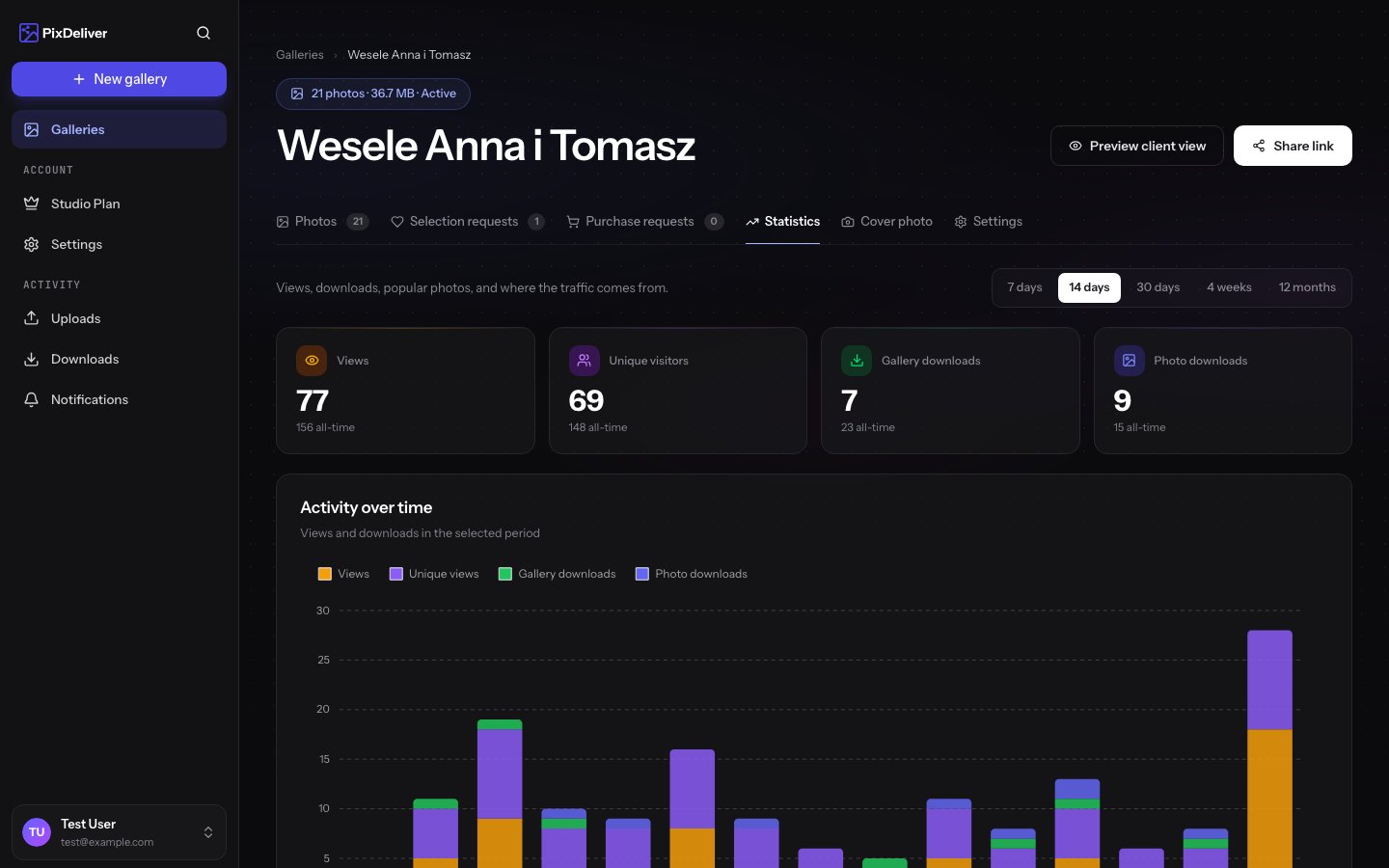
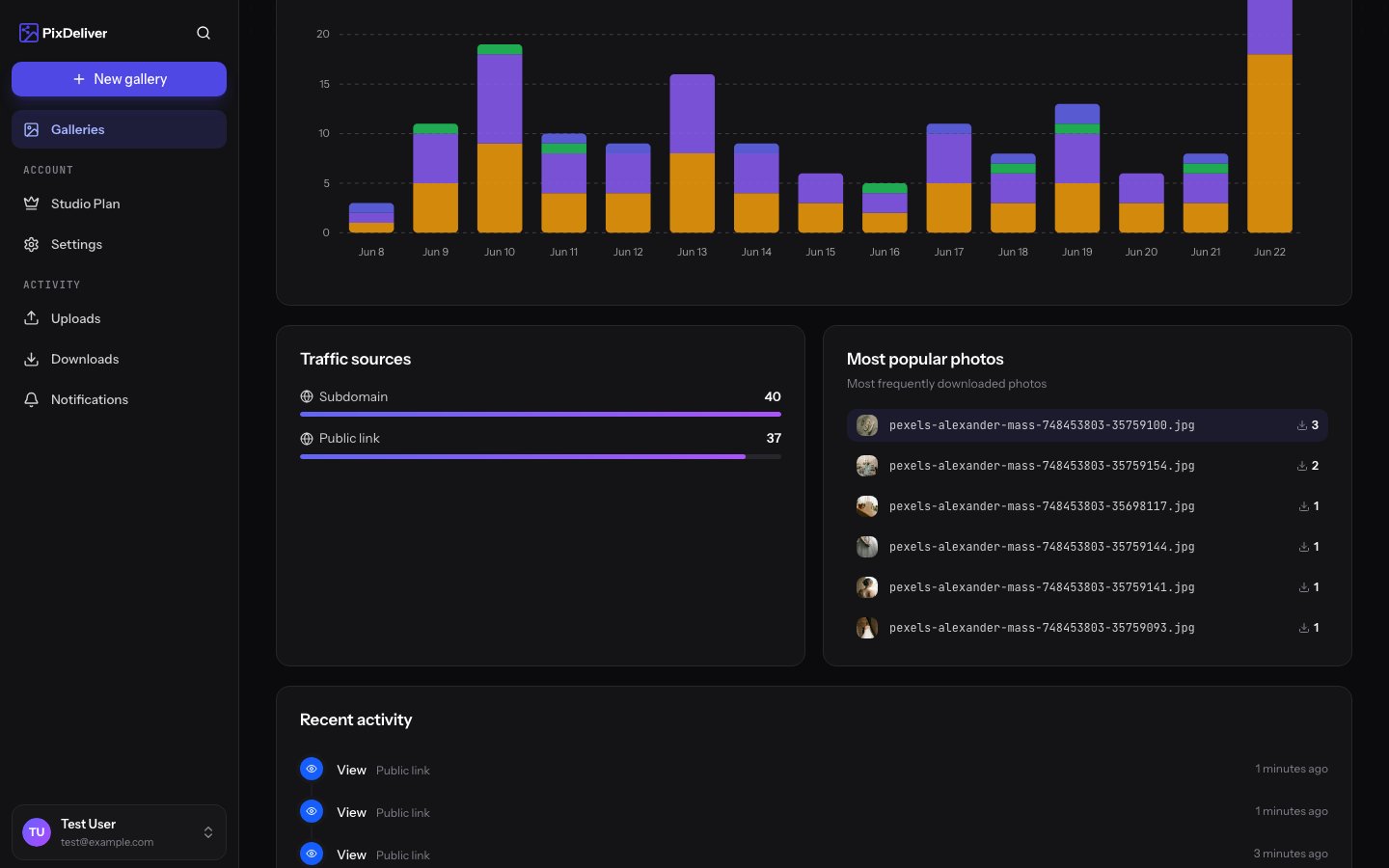
The Dashboard is the central place in PixDeliver where you'll see a summary of all your galleries, your statistics, and important notifications. It's your command center for the platform.
***
## Dashboard elements
### Statistics summary
**At the top of the Dashboard you'll see:**
📊 **Overall statistics:**
* **Number of galleries** - how many galleries you've created (all statuses)
* **Active galleries** - how many galleries are currently paid and available
* **Total number of photos** - how many photos you've uploaded to the platform
* **Storage used** - how many GB you're using (handy for planning)
📈 **Statistics from the last 14 days:**
* **Views** - how many times your galleries were opened
* **Unique visitors** - how many different people visited the galleries
* **Downloads** - how many times photos were downloaded
***
## Gallery list
### Gallery view
Each gallery in the list shows:
**Thumbnail:**
* The gallery's cover photo
* Or a placeholder if no cover photo is set
**Information:**
* **Gallery name**
* **Status**: Unpaid / Active / Expired
* **Number of photos** - how many photos the gallery contains
* **Size** - how much storage it uses
* **Creation date** - when the gallery was created
* **Expiration date** (for active galleries)
**Quick actions:**
* **Open** - go to the gallery
* **Edit** - open the settings
* **Statistics** - view the full statistics
* **Copy link** - copy the gallery link
***
## Notifications and alerts
The Dashboard displays important notifications:
### 🟠 Upcoming expirations
```
⚠️ 3 galleries are expiring within 30 days
- "Anna & Tomek's Wedding" - expires in 15 days
- "The Kowalski Family Session" - expires in 22 days
- "Corporate Event" - expires in 28 days
[Button: Renew galleries]
```
### 🔴 Expired galleries
```
❌ 2 galleries have expired
- "Kasia's Maternity Session" - expired 5 days ago (9 days left until deletion)
- "Business Portrait" - expired 12 days ago (2 days left until deletion)
[Button: Renew now]
```
### ⚙️ Failed conversions
```
⚠️ 3 photos were not processed
Gallery: "Ania's Wedding"
- IMG_0145.jpg - Corrupted file
- IMG_0267.jpg - Unsupported format
- IMG_0389.jpg - Size limit exceeded
[Button: View details]
```
### 📩 New selections
```
✅ 2 new selection submissions
- Anna Kowalska - choosing for the album (80 photos) - 2 hours ago
- Tomek Nowak - photos to print (10 photos) - 5 hours ago
[Button: View submissions]
```
***
## Filtering and sorting galleries
### Filters
**By status:**
* All
* Active
* Unpaid
* Expired
**By date:**
* Newest
* Oldest
* Expiring soonest
### Search
**Instructions:**
1. Use the search field at the top of the list
2. Type part of a gallery name
3. The list filters automatically
**Example:**
* Type "wedding" → you'll see all galleries with the word "wedding"
***
## Quick stats in the list
For each active gallery you'll see icons with quick statistics:
👁️ **123** - views (last 14 days)
📥 **45** - downloads (last 14 days)
📸 **250** - number of photos
💾 **4.2 GB** - size
***
## Dashboard tips
**Check the Dashboard regularly** (at least once a week) to:
* Not miss any galleries that are expiring
* Respond to selections from clients
* Monitor activity in your galleries
* Resolve conversion issues
***
## Related topics
* [Gallery renewal](/en/payments/gallery-renewal) - How to extend expiring galleries
* [Managing submissions](/en/selections/manage-submissions) - Reviewing client selections
## Overview
The Dashboard is the central place in PixDeliver where you'll see a summary of all your galleries, your statistics, and important notifications. It's your command center for the platform.
***
## Dashboard elements
### Statistics summary
**At the top of the Dashboard you'll see:**
📊 **Overall statistics:**
* **Number of galleries** - how many galleries you've created (all statuses)
* **Active galleries** - how many galleries are currently paid and available
* **Total number of photos** - how many photos you've uploaded to the platform
* **Storage used** - how many GB you're using (handy for planning)
📈 **Statistics from the last 14 days:**
* **Views** - how many times your galleries were opened
* **Unique visitors** - how many different people visited the galleries
* **Downloads** - how many times photos were downloaded
***
## Gallery list
### Gallery view
Each gallery in the list shows:
**Thumbnail:**
* The gallery's cover photo
* Or a placeholder if no cover photo is set
**Information:**
* **Gallery name**
* **Status**: Unpaid / Active / Expired
* **Number of photos** - how many photos the gallery contains
* **Size** - how much storage it uses
* **Creation date** - when the gallery was created
* **Expiration date** (for active galleries)
**Quick actions:**
* **Open** - go to the gallery
* **Edit** - open the settings
* **Statistics** - view the full statistics
* **Copy link** - copy the gallery link
***
## Notifications and alerts
The Dashboard displays important notifications:
### 🟠 Upcoming expirations
```
⚠️ 3 galleries are expiring within 30 days
- "Anna & Tomek's Wedding" - expires in 15 days
- "The Kowalski Family Session" - expires in 22 days
- "Corporate Event" - expires in 28 days
[Button: Renew galleries]
```
### 🔴 Expired galleries
```
❌ 2 galleries have expired
- "Kasia's Maternity Session" - expired 5 days ago (9 days left until deletion)
- "Business Portrait" - expired 12 days ago (2 days left until deletion)
[Button: Renew now]
```
### ⚙️ Failed conversions
```
⚠️ 3 photos were not processed
Gallery: "Ania's Wedding"
- IMG_0145.jpg - Corrupted file
- IMG_0267.jpg - Unsupported format
- IMG_0389.jpg - Size limit exceeded
[Button: View details]
```
### 📩 New selections
```
✅ 2 new selection submissions
- Anna Kowalska - choosing for the album (80 photos) - 2 hours ago
- Tomek Nowak - photos to print (10 photos) - 5 hours ago
[Button: View submissions]
```
***
## Filtering and sorting galleries
### Filters
**By status:**
* All
* Active
* Unpaid
* Expired
**By date:**
* Newest
* Oldest
* Expiring soonest
### Search
**Instructions:**
1. Use the search field at the top of the list
2. Type part of a gallery name
3. The list filters automatically
**Example:**
* Type "wedding" → you'll see all galleries with the word "wedding"
***
## Quick stats in the list
For each active gallery you'll see icons with quick statistics:
👁️ **123** - views (last 14 days)
📥 **45** - downloads (last 14 days)
📸 **250** - number of photos
💾 **4.2 GB** - size
***
## Dashboard tips
**Check the Dashboard regularly** (at least once a week) to:
* Not miss any galleries that are expiring
* Respond to selections from clients
* Monitor activity in your galleries
* Resolve conversion issues
***
## Related topics
* [Gallery renewal](/en/payments/gallery-renewal) - How to extend expiring galleries
* [Managing submissions](/en/selections/manage-submissions) - Reviewing client selections