

Overview
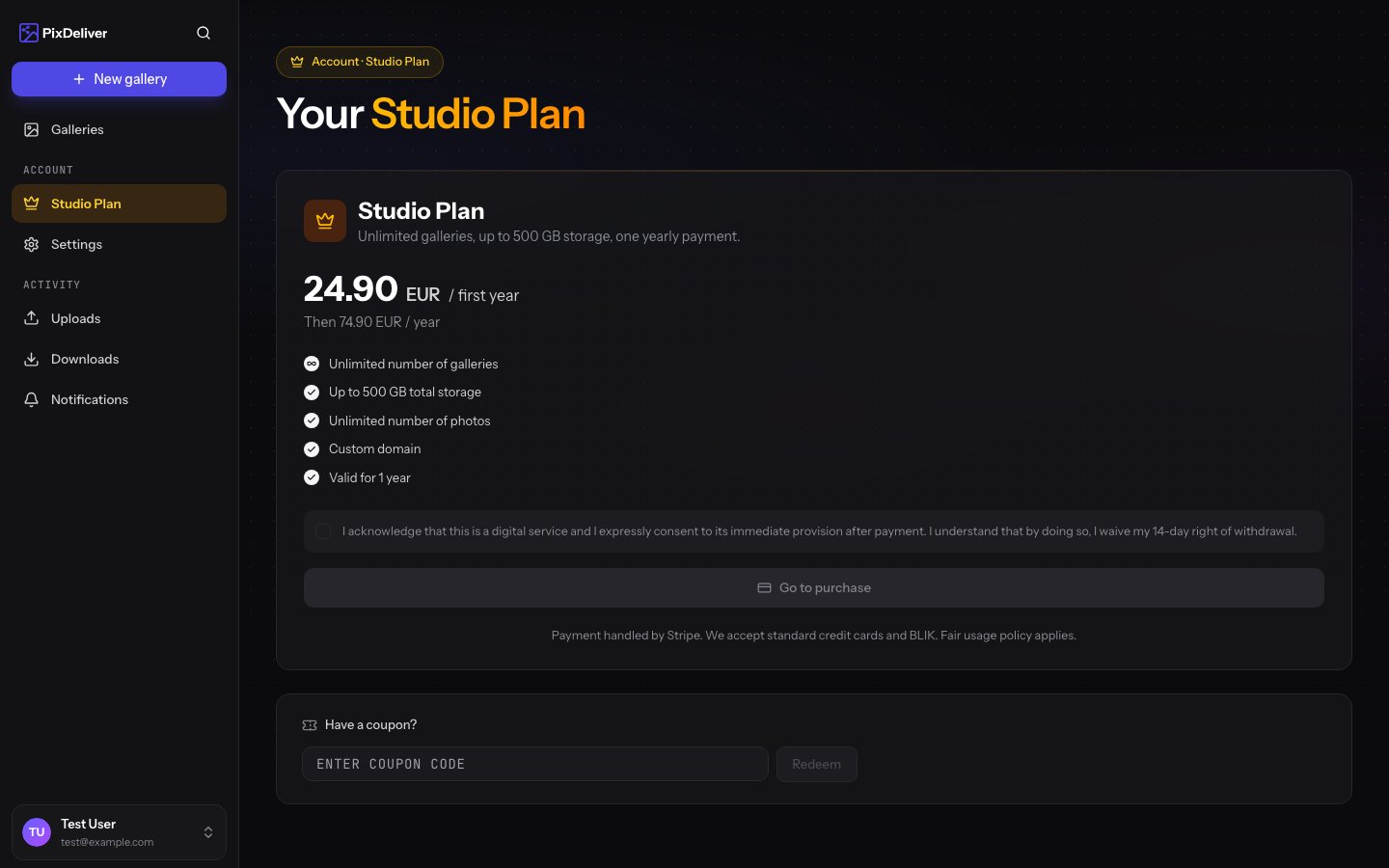
The Studio plan is an annual plan tied to your entire account, not to a single gallery. Once it’s activated, all galleries belonging to your account are publicly available without having to pay for each one individually. Key information:- One fee covers an unlimited number of galleries
- Combined storage limit: 500 GB for all galleries together
- First activation: 99 PLN/year (promotional price for new users)
- Renewal: 299 PLN/year
- No automatic renewal — the fee is charged manually
Where to manage the Studio plan
You activate and renew the Studio plan in Account settings, not on the main dashboard or within an individual gallery. Instructions:- Sign in to PixDeliver
- Go to Settings → Studio plan (
/account/subscription) - You’ll see your current account status:
- No active Studio plan — an Activate Studio plan button
- Active Studio plan — information about the expiration date and any renewal window
- Grace period — a Renew Studio plan button
Activation
Who gets the promotional 99 PLN price
The 99 PLN price applies on the first activation of the Studio plan. If you haven’t had an active Studio plan before, you qualify automatically. After the first activation, every subsequent renewal costs 299 PLN/year.Payment process
- On the Studio plan page, click Activate Studio plan
- You’ll be redirected to the secure Stripe payment panel
- Choose a payment method:
- BLIK (the fastest option)
- Card (Visa, Mastercard, American Express)
- Apple Pay / Google Pay (depending on your device, browser, and region — if unavailable, use BLIK or a card)
- Pay for the Studio plan
- Once the payment is confirmed, you return to PixDeliver, and all of your galleries are immediately covered by the Studio plan
Payments are handled by Stripe in PLN. PixDeliver does not store your card details.
Renewal
The Studio plan does not renew automatically. You have to initiate the renewal manually. Renewal window: you can renew the Studio plan 30 days before the expiration date or during the 14-day grace period after expiration. Email reminders: you’ll receive notifications about the upcoming expiration — beforehand, on the expiration date, and near the end of the grace period. After renewal:- If you renew before expiration — the new expiration date is counted from the previous one (you don’t lose any days)
- If you renew during the grace period — the new expiration date is counted from the renewal date
Grace period (14 days)
After the Studio plan’s expiration date, you have 14 days to renew. What you can do during the grace period:- Renew the Studio plan (full access returns immediately)
- Individually pay for selected galleries with a per-gallery plan (Small or Large gallery)
- Download ZIP archives of photos before potential deletion
- Galleries without their own active per-gallery plan are permanently deleted, along with their photos and statistics
- Galleries with an active per-gallery plan are kept until the end of their own validity period
How it works alongside per-gallery plans
The Studio plan and per-gallery plans (Small gallery, Large gallery) complement each other rather than exclude each other. Main rule: a gallery stays active until the later of the two dates — the expiration date of its own per-gallery plan or the expiration date of the Studio plan. Example scenarios:Galleries covered by an active Studio plan do not need a separate per-gallery renewal — they are automatically covered by the Studio plan.
The 500 GB limit
The Studio plan includes a combined total of 500 GB of storage for all galleries. That’s a very high limit — it lets you upload tens of thousands of photos. For example, when a typical gallery is around 10 GB, you can fit as many as ~50 such galleries on your account. Key rules:- The limit is counted as the sum of uploaded photos across all galleries on your account
- Maximum size of a single photo: 30 MB
- Once you exceed the limit, the system will block uploading new photos
- Deleting photos frees up space immediately
Coupon codes
Discount codes can be applied to both the Studio plan and individual galleries. The code field is located in the Studio plan panel before you proceed to payment. Redemption rules:- You can use each coupon once per account (coupons are marked as single-use or multi-use)
- A coupon valid for a per-gallery plan won’t work on the Studio plan (and vice versa) — the system will inform you of the mismatch
- After applying a coupon, the price on screen is recalculated before you confirm the payment
Frequently asked questions
Does the Studio plan renew automatically? No. Every renewal requires a manual action. You’ll receive a reminder email before expiration. Can I cancel the Studio plan and get a refund? After activation, the payment is non-refundable. The Studio plan stays active until the end of the paid year. What happens to galleries after the Studio plan expires? First, a 14-day grace period begins — galleries without their own per-gallery plan become publicly unavailable. After 14 days, such galleries are permanently deleted. Galleries with an active per-gallery plan remain untouched. Can I switch from per-gallery plans to the Studio plan during the year? Yes. Activate the Studio plan whenever you want — all active galleries keep their own expiration dates and are additionally covered by the Studio plan. Galleries stay available until the later of the two dates. Does the Studio plan cover only galleries that exist at the moment of activation? No. The Studio plan covers all galleries on your account — existing ones and those you create later during the active period. What if I exceed the 500 GB limit? The system won’t let you upload more photos. You can delete old galleries or photos to free up space. If you regularly hit the limit, get in touch with us for a custom quote.Related topics
- Plans and pricing - Full comparison of per-gallery plans and the Studio plan
- Gallery renewal - The lifecycle of a single gallery and the grace period
- Coupon codes - How to use a discount code